Pi Day
I made Pi
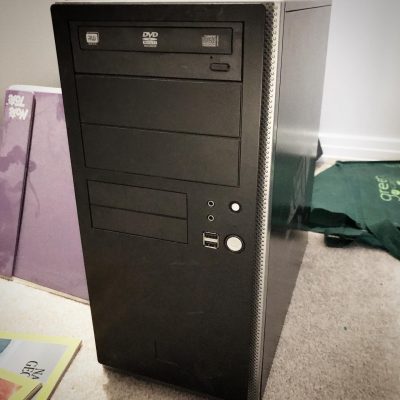
A couple of power failures too many and my old PC which I had converted to a linux box was starting to wear. I had installed NGINX Proxy Manager on it and a) it was a bit slow and b) wasn’t coming back up after power failures. And since I had routed most of my internal web access through it it was… well… annoying.
What made it worse was after a power failure I had to haul the old black box upstairs, plug it into my monitor and keyboard and reboot it it to get past a bunch of warnings. Then haul it back downstairs and reboot it again. The last straw was the third time when the hard drive showed an error that I couldn’t fix from the prompt.
Talking myself into it.
I had been sniffing around Raspberry Pi’s for a bit now. For those who don’t know, Raspberry Pi’s are a single-board hobby computer that are dirt cheap. The latest iteration, the Pi 4b came with 8 gig of RAM which was 6 gig more than my old box had.
Specs
- 8 gig Ram
- USB 2 (2) and 3 (2)
- 2 HDMI ports
- gigabit ethernet
- Quad core ARM 64-bit processor @ 1.5GHz
- 2.4 GHz and 5.0 GHz IEEE 802.11ac wireless,
- Bluetooth 5.0
- Micro-SD card slot for operating system and data storage
The old Linux box, on the other hand, had 2 cores, 2 gig of ram, no HDMI, no wifi, no USB 3, 10mb ethernet, and no bluetooth. The only saving grace it had was it had payed for itself many times over.
Costs
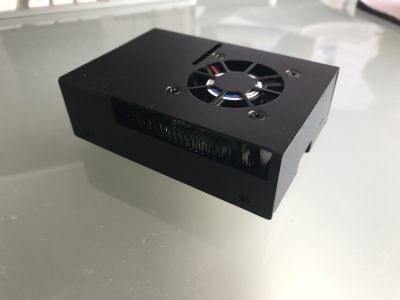
A Pi though, was just a plain board; so in addition to the cost of the unit I would need some new cables, a case and a power supply. I found a combo deal for the extras and made a trip to Memory Express to pick it all up.
$112.99 Pi 4b 8gb ram
$24.99 Case/fan/power supply/heatsinks kit
and
$14.99 hdmi -> hdmi mini cable
$24.99 external case for my old 500gb drive
Total: $186.86 including tax
A steal! Of course I also need 16+ gig micro sd card (~$20) but thankfully I had a couple of 32s already. I also discovered I only had one usb keyboard (all my old PC keyboards were ps2) — so that was a pain having to swap back and forth. But after it was setup I wasn’t going to need one so I just toughed it out.
What OS?
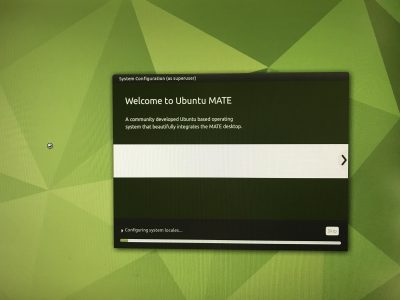
I hemmed and hawed about what to install. Since this was a machine for learning and using linux I wanted as close to a vanilla experience as possible. In the end I settled on Ubuntu Mate as it was pretty close to what I had used on my old machine (Mint Mate). Most people go with a Raspbian OS install which is the default but it is Debian based and I wanted to stick with Ubuntu. ubuntu-mate.org/raspberry-pi/install/
I also wanted to be able to boot off an external USB drive so I had to “flash the eeprom” … essential write some permanent code to the chip so it would recognize the external drive as a bootable one. The only really scary part of the process but it worked just like the install instructions said it would.
Once again in English
Linux is an operating system. A distro (i.e. Ubuntu, Debian, Mint etc.) is a variety each of which may have made different choices in its history about which components to use to accomplish certain tasks. Sort of like a carburetor vs fuel injection on cars. A flavour (i.e. Mate, KDE, XFCE) is essentially just the desktop environment and apps; it may have different options installed and choose different base applications like word processors or web browsers. Think the SE model of your car vs. the LE model.
In most cases you can mix and match a lot of the options and customize your setup as much as you want because they are all based on the same core operating system.
In the end
To skip ahead, I did get a good install of Ubuntu Mate up and running — although once again getting the VNC client to run automatically chewed up hours. But in the end I changed my mind and went with a Ubuntu Server install which has no GUI or desktop (thus “wasting” all the time spent on getting the VNC to work). I figured it would be cleaner and I might as well learn to rely on the command line interface. ubuntu.com/tutorials/how-to-install-ubuntu-on-your-raspberry-pi I did keep the working install of Mate on my other sd card so I can go back to that when I have time and energy.
Also, for next time, I could have saved myself the $15 for the hdmi adapter cable as I have now figured out how to do the install remotely without using a monitor at all. Of course I needed the cable to see what it was I was doing as I learned how to do it without seeing it. So I guess I needed it after all. But next time…

Problems? What problems?
I have to say that the initial install went so very, very smoothly. I had a computer up and running in a couple of hours with zero issues. Of course, it wasn’t the computer I wanted and that’s where it started to go sideways. Most of it was operator error and I learned a lot (more on that in future posts) but one thing sticks out as a stupid error.
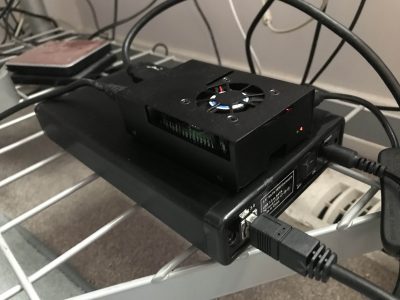
I had picked up the cheapest external case I could find to use the old 500gig drive on the Pi. The intention was to make it a boot drive and eschew the sd card entirely. But as I mentioned the drive was now showing errors and I had files I wanted to retrieve. I had intended to boot the old box from the drive after I moved it in to the case and drive and troubleshoot the drive using my Mac. But it was a USB 3 case with no backward compatibility. And the old black box only had USB 2 so it now couldn’t see the drive. Deja vu back to the original install Sigh.
No problem. I had borrowed one of my other external cases (from my backup drive) when I did the initial install way back when, so I could just swap cases. The problem arose when I broke something in the swap. The older case was not meant as a replacement unit and had tighter tolerances. By the time I had swapped drives for the 4th time it no longer powered up the drive…I must have bent something not meant to be bent. F*ck. So the new case went to my 2TB backup drive and back to my desk and I need to go get a new case.
At the end of the day (actually I think this was day 3) I decided I could forgo retrieving anything off the 500gb drive and, after I got a new case, I just reformatted the drive and started from scratch. Hopefully I didn’t forget to backup anything important but que sera, sera. I also realized much too late that of course I could have continued to run the Pi off the sd card and accessed the old drive in the original case I bought for whatever troubleshooting needed to be done. Sigh again.
My best moment in the whole process though, was when after I was up and running and happy with everything, I made an image of my sd card onto my Macbook. And then I plugged in the external, wrote the image to the disk, plugged it into the Pi and — omfg — the thing Just Worked.
In conclusion
So. I now have a fully functional computer about the size of a pack of cards that will do pretty much everything a light-weight computer user would want. The Pi’s have no graphics card per se so games are not really in the cards and they say it can struggle with high quality YouTube at times but that’s not really important for most people. On the other hand it can run two monitors right out of the box.
Linux has open source options for pretty much everything from an office suite to image editing that are compatible with most standards and can run most of the popular web browsers like Firefox and Chrome. So for <$200 (providing you have a monitor, mouse and keyboard) you can have a pretty damn fast computer that won’t be so different from a Windows machine or a Mac.
I have a lot more to say about the install but I think it will be a separate step-by-step-ish post. Suffice it to say after about 3 or four days of installing, googling and reinstalling I have a setup I like and can backup/restore easily. So it’s time to let the breaking commence!
Auto mount network shares: autofs
Edited to make it work correctly
- It wasn’t surviving reboots
- I had given my mac a permanent IP for another reason so I decided to use that
- I renamed the Calibre Library share to Calibre-Library in order to get rid of the pesky space/em>
- I was also attempting to get Calibre-Web to run from a LaunchDaemon
Apparently there is a BSD utility called autofs that mounts network drives on demand. And with OS X’s unix underpinnings this means it works on your Mac.
This is revolutionary. If you’ve worked in a server environment or tried to store your iTunes or iPhoto library on an external drive you will know, things like network outages, reboots or even taking your laptop offsite will mean you have to reconnect, which while not arduous, is a bit annoying and often hard to explain to users.
In my case I run Calibre-Web on my mac-mini server but house the calibre db on my personal machine. Which means I resorted to writing a script to reconnect every time I rebooted something…which seemed to be be pretty often.
The code
Disclaimer: this is the code for my old mac mini which is stuck on High Sierra 10.13.6. I have read (see links below) that it works slightly differently for newer versions of OS X.
First off edit the auto_master file to insert the auto_smb line and comment out the /net line:
sudo nano /etc/auto_master
#
# Automounter master map
#
/mount auto_smb
+auto_master # Use directory service
#/net -hosts -nobrowse,hidefromfinder,nosuid
/home auto_home -nobrowse,hidefromfinder
/Network/Servers -fstab
/- -static
Then you will create the config file you specified above (auto_smb):
sudo nano /etc/auto_smb
The first bit is the location of the share. In this case I called it calibre and wanted it to mount in the volumes folder with all the the rest of the regular mounts.
Then you need to add the login information including your name and password and the network location. An IP will work just as well if you are using a static one.
Calibre-Library -fstype=smbfs,rw ://username:password@192.168.1.20/Calibre-Library
Other Uses
At some point I am going to move L’s ever-growing music library to something like a NAS (network attached storage) and this will be a godsend if it works the way it has so far. Fingers crossed.
Sources
https://useyourloaf.com/blog/using-the-mac-os-x-automounter/
Afterword
After all that, it doesn’t solve the problem I thought it would. When my mac hosting the calibre library goes down it send the python code in Calibre-Web into an unrecoverable tailspin. So even though the share comes back up it still needs a restart to make it happy again. So I am only halfway there.
Ebook update
I kind of got stuck on Wodehouse’s shorts, then lost all the work is a stupid file transfer error. But L helped me redo it and I knocked out a few new plays since then. As of now my total is 35 books (you can see the whole list here: https://astart.ca/publishing/ebooks
Of note, I actually got paid to produce a few of these so I guess that makes me a professional?








Instagram Since Last Time

ROTFLMAO
The US is definetly in America, but you are way off its so similar to Canada. Canada is under tremendous lockdowns, they don’t have Freedom of speech, they have a large wellfare state, etc. They are similar only in language and by proximity. I guess all Central America is the same to you?
—https://www.cruisersforum.com/forums/f48/la-vagabonde-i-dont-understand-252419.html#post3431451
I wrote something about being Angry
But I’m not gonna post it.
There’s too much anger already.
Don’t be angry.
The Enneagram Personality Test
Never heard of it before, but I gave it a shot…
Your primary type is
Seven.
98% MATCH
Type 7 is described as The Enthusiast. Sevens want to have as much fun and adventure as possible and are easily bored.Nine
97% MATCH
Type 9 is also called The Peacemaker. Nines like to keep a low profile and let the people around them set the agenda.
Sevens are defined by their desire to experience everything good and pleasurable that the world has to offer, while avoiding pain, boredom, and limitations. Although Sevens appear enthusiastic and fun-loving, deep down, they have a fear of getting stuck in negative emotions. Thus, they tend to disconnect from their deeper feelings, instead focusing on their imagination and zest for life to keep them moving forward and gathering new, pleasurable experiences.
Sevens aim to fill every minute with an activity. They approach life as an endless rollercoaster of fun, joyous experiences—and if not fun, at least not sad, bored, anxious, depressed or painful. Sevens use their charm, enthusiasm, imagination, and positive attitude to get as much enjoyment as possible out of every moment of life. Ideally, a Seven aspires to ride a continuous high, avoiding the drearier aspects of reality.
Super power:
Optimism. Your dedication to a glass-half-full mentality keeps you going when others might give up, and gives you the courage to try things that many might see as too risky. You genuinely believe that things usually work out for the best, and with your determination to make things go your way, this is often a self-fulfilling prophecy. You have a tendency to be optimistic even when things are dire, and sometimes this means that you gloss over the negative and are taken by surprise when problems arise. When it comes to important plans, be sure to take time to think about how things could go wrong, even if it feels unnatural and overly pessimistic. Once your due diligence is done, you can move forward with even more confidence that things will work out in your favor.
Two
61% MATCH
Type 2 can be described as The Giver. Twos want to be liked and find ways that they can be helpful to others so that they can be loved and belong.
Three
56% MATCH
Type 3 is also known as The Achiever. Threes want to be successful and admired by other people, and are very conscious of their public image.
Four
68% MATCH
Type 4 is known as The Individualist. Fours want to be unique and to live life authentically, and are highly attuned to their emotional experience.
Five
92% MATCH
Type 5 is described as The Investigator. Fives seek understanding and knowledge, and are more comfortable with data than people.
Six
48% MATCH
Type 6 is also known as The Skeptic. Sixes are preoccupied with security, seek safety, and like to be prepared for problems.
Seven
98% MATCH
Type 7 is described as The Enthusiast. Sevens want to have as much fun and adventure as possible and are easily bored.
Eight
63% MATCH
Type 8 is also known as The Challenger. Eights see themselves as strong and powerful and seek to stand up for what they believe in.
Nine
97% MATCH
Type 9 is also called The Peacemaker. Nines like to keep a low profile and let the people around them set the agenda.
One
43% MATCH
Type 1 can be thought of as The Perfectionist. Ones place a lot of emphasis on following the rules and doing things correctly.
Governments and truth
I wrote this rambling reply to a Cruisers Forum conversation surrounding the Gov’t’s ability to communicate facts. Then I decided not to post it. But it has some thoughts worth preserving so…
[QUOTE=Mike OReilly;3401382]Yes … see even I’m doing a piss-poor job here, and I’m a science writer :redface:.
If your choice is binary: mRNA vs viral vector, it makes perfect sense to go with the one that has slightly less risk, and slightly more efficacy. But none of these choices are binary. There are multiple factors, including availability AND most importantly getting any vaccine sooner rather than later.
The risk of contracting Covid-19 far outweigh the risk of getting a weird blood clot; by something like 10,000 fold. But an honest scientist will tell you the risk is greater with AZ and Jansen than with Pfizer or Moderna, so in some hypothetical situation where you can reduce your risk of contracting the disease to near-zero, it makes sense to hold out for the lower-risk vaccine.
But this all requires an ability to rationally assess risk, and that is something few people know how to do.
It reminds me of the first time I went to see a lawyer. I wanted to know if I could start a business without doing anything other than opening a bank account. An hour of risk assessment, fear mongering and over-explaining worst-case scenarios he wrapped up up with a simple “yes, but you will be personally liable.” Since all I wanted to do was graphic design under a company name it seemed a bit hysterical. I now realize that all that liability he was talking about applied to him as well. If he didn’t do his damnedest to scare the bejesus out of me he would have been “shirking” his responsibilities.
It is really hurting my brain to listen to all the people who b*tch about governments lying and withholding information or just plain being wrong. Do I think this whole thing has been a case-study in communication f*ck-ups? Yes. But the thing most people think the gov’t is there to do isn’t accurate (at least outside the US…they have a weird origin story…). They aren’t primarily responsible for telling us the truth etc.—they are responsible for the common weal. And if anyone has been a parent you know that doesn’t always involve “truth” or “justice.” We can argue about that if you want, but I just want my government to do what needs to be done—I really couldn’t give a damn if they have to mislead me in order to get the rest of the population to line up and toe the line. Up to a point.
Instagram Since Last Time




900: My Library in 2021
I own 863 books. Well I might own a few more here and there (books that I have worked on but not necessarily “read” etc.) but my main library — of mostly SF/Fantasy — consists of 863 titles. It took me almost 40 years to accumulate those.


Yes, I have a spreadsheet. I also haven’t bought a new book in 10 years…for certain definitions of “book.”
Ebooks
On the other hand, today I bought my 900th ebook.
For Xmas in December 2009, L bought me my first ereader—a Sony Reader PRS-600 (read about it here). I was suspicious but willing to give it a chance. On January 1, 2010 I bought my first ebook: March to the Stars by David Weber and John Ringo from Baen for $5 usd (the same book is now $6.99). I chose a Baen book (and generally still do) because of their non-drm policy.
So, since 2010, I have accumulated more ebooks in ~10 years than I did in the preceding 45. That says something about me, but I am not sure exactly what 🙂
Number 900?
I decided on Steven Brust’s The Baron of Magister Valley —a very under-marketed book published last year that I didn’t realize even existed until very recently. I have been trying very, very hard not to acquire any new books in order to get my To-Read pile down. I can happily announce that, other than a pile of “backup book” (classics and freebies that I have in case of emergency but don’t really intend to read unless I have to), I was down to 3. Woohoo!
So I went on a buying spree: A Desolation Called Peace by Arkady Martine, Martha Wells’ Fugitive Telemetry —number 6 of awesome The Murderbot Diaries and The Assassins of Thasalon (Penric & Desdemona) from Lois McMaster Bujold. Which brought my ebook count to 899.

Well, what’s a fella to do? Buy another book of course. Despite it costing $14.99. Seriously? Fifteen bucks?
Whatever.

But it’s done. And now happy reading!