Category: Computers
Flexible Maps Again
I had previously figured out how to use the WP Flexible Map plug-in to re-integrate my Navionics KML files with my WordPress blog after changes to Google MAps made my old way inoperable. Those links, however, no longer seem to work. Either those links die after a certain period of time or, as the links themselves seem to indicate, Navionics has changed file servers to Amazons S3 service and broken them all. I could go back and relink them all but that seemed futile and, likely, temporary.
This means I need to figure out how to solve my problem again. And this time I intend to just figure out how to download the KMZs to my own file server or cloud and then cut out the possibility of depending on someone else’s data storage.
As a side note, Google has finally discontinued support for their old maps application and moved completely to the new one — which was what caused me problems in the first place. Older KMZ links to Google Maps from past adventures still seem to work, albeit very slowly.
My first plan was to use Dropbox as a file server. Along the way I discovered that Flexible Maps was now properly using KMZs — not sure when that happened. This allowed me to drop the step where I had to open up the KML file on Navionics server and the copy and paste the url to WordPress.
To Use Dropbox, I created a kmz folder in the Public Folder provided by Dropbox and then, in Navionics, shared the Track creating an email with link to the KML, a graphic of the track and an attached kmz file. The problem here is that to make the link to the kmz attachment clickable, you had to actually email it. To get the kml, the link was already active — you only had to click it to open it in Safari. Remember this is all has to be done on my iPhone. So I sent the email.

After receiving and opening the email to myself, I could hold down the kmz link and save the file to Dropbox, selecting my KMZ folder in the Public folder. So far so good, except I soon discovered that while using the browser or desktop interface I could easily generate a public link, this functionality was not available on the Dropbox iOS app. All I could do was download it. This means I had no url to paste into WordPress. Back to square one. But since I wasn’t completely keen on hosting the KMZs on Dropbox anyway ( I tend to think of it as ephemeral storage) I guess that is a good thing.
Plan B is to create a kmz folder on Macblaze.ca and find an ftp app to upload the KMZs there. I downloaded FTP Manager Free, and went through the whole process again. To be safe I created a new ftp user account on my hosting site that only had access to the kmz folder. So now I open the file on the received email and open with FTP Manager. From there I upload it to the kmz folder and voila…

Now I have a web-accessible link on my own webserver that will get backed up with the rest of my files. To call the KML file you simply include the shortcode [flexiblemap src="http://macblaze.ca/kmz/source url"]
[flexiblemap src=”http://macblaze.ca/kmz/Day15.kmz”]
Next
I am not overly happy with FTP Manager for this purpose ( a few too many steps for such a simple operation) and really don’t like having to send a n email to myself. This can get problematic when floating in some secluded bay somewhere with crappy access to the internet. I will keep looking but for now I guess I go back and redo all the old links…
Kobo Stupidity
Anyone who has ever heard me rant about online ebook booksellers’ closed system (yes, I am talking to you Amazon) knows I think the way we are currently selling ebooks is ridiculous, immoral and dangerous. When I first started reading ebooks I almost gave up because I couldn’t figure out why my well-established sense of book ownership was being thrown away in the new commerce of ebooks. It was as if the booksellers/publishers were trying to lease me books rather than sell them to me. At one pint (although I am not sure if it is still true or not) Amazon was able to erase purchased books from your library without any permission at all.
I got over it, and with the help of Calibre, I set up a DRM-free system that allowed me to ‘sideload’ all my purchases to all my ereaders, iPhones and iPads and eventually to my Android-based Nexus 7. All I had to do was avoid Amazon (because they are a closed-system fount of evil) and iBooks (because their drm was too hard to crack).
I bought everything I could direct (and drm-free) from Baen and eventually settled on Kobo as my goto source of ‘other’. Recently Tor has joined the ranks of drm-free publishers and so now 90% of my purchases I don’t even need to strip the drm.
Well as of this week that has changed. For the worse. I bought Hawk, a new Vlad Taltos book from Steven Brust on the Kobo website as was my usual pattern but when I went to my Kobo library there was no way to download the actual file. The download link was gone. I did a bunch of googling but couldn’t see that anyone else had the same problem so I figured it was a glitch. After I got no response from Kobo’s auto-help mail form, I eventually broke down and called. I got some half-ass explanation that it was an epub3 file and that I would have to use the Reader for Mac app that my Sony (something I de-installed ages ago) came with or read it on a proprietary Kobo app. Uh, no… I don’t think so.
The follow up email they sent me:
Dear Sir,
Thank you for contacting Kobo Customer Care. It was our pleasure assisting you today.
You contacted us today as you could not download a book (“Hawk”) from the website. We apologize for the inconvenience this may have caused.
This is due to the fact that this book is in a specific format (ePub3). You can only download it via the software “Reader for Mac”.
To sign in using your Kobo account, Click on “Edit” >> “Preferences” >> “Account” >> “Sing in”
Should you have further concerns, you may visit our HELP section online at www.kobobooks.com/help. Or call us at:1 (800) 368-5390
For your records, here is your Reference Number: xxxxxxxxx
Thank you.
Sincerely,
The Kobo Team
I looked at Reader for Mac later and it had no such Edit::Preferences etc. Of course the software I have is years old as it resides on the e-reader itself. Sony Bookstore is defunct so I doubt there are any updates available. And I couldn’t be bothered.
Now that I knew what I was looking for the Google hits came fast and furious. Seem Tor, for some unknown reason, has begun to package their ebooks as epub3 files. When submitted to Kobo, Kobo then auto-converts them to a proprietary kepub format that is not downloadable. No one seems to know why Tor or Kobo are doing this and apparently if I went to another retailer I would be able to download the epubs easily enough. That didn’t help me as I had already forked out the $11 for the book and shouldn’t have to pay again for something I already owned.
The Digital Reader.com provided a solution. So it seems if you install the Kobo Desktop App and then download the file, you can then install a plugin called Obok (here is the download link from the digital reader site) in Calibre and be able to import the ebook files that way. Didn’t work. Other books I had purchased from Kobo showed up but not Hawk. But a bit of comment reading showed that the issue was that Hawk was already DRM free so the plugin didn’t work. But is seems the kepub files had been downloaded to //Users/admin/library/application support/kobo/kobo desktop edition/kepub/ (on my Mac) and I merely needed to copy the file from that (hidden) directory and add the .epub ending to get my book.
This however means I have to use terminal and command line since the files are hidden. After a bunch of screwing around I came up with this:
cp -r //Users/admin/library/application\ support/kobo/kobo\ desktop\ edition/kepub/ /users/admin/documents/my\ books/
This copies the contents of the kepub folder to my Documents/My Books folder in the admin account I usually use. Then I manually added the .epub and imported the book into Calibre. Worked like a charm.
As for Kobo, I am very likely to go elsewhere because this is nonsense and I shouldn’t have to read my books in their ecosystem for no other reason than they are trying to force me to use them as my sole provider of reading material. I will likely fire off an email to Tor as well as there is no apparent reason for this file format.
Find the solution and the comments here:the-digital-reader.com/2014/09/25/download-kobo-ebooks-including-ones-wont-allow/
Key-bored
One of the new features of iOS 8 is the new keyboard. Those of you reading my travel posts this last summer will have noticed the increased typos and ‘autocorrect’ errors that cropped up. I blamed it on the new phone.
But I have to say that so far this update is impressive on the keyboard front. I only had to go back and correct one error in the above.
🙂
Posting tracks on WordPress
[flexiblemap src=”http://wa01.navionicsmobile.com:8080/up/up//1401730734499Marker/newdoc.kml”]
This is the proposed route for our first day of our upcoming trip. Be sure to follow along at Sailing 2014. I am using it here to test Navionics’ shared KML files.
Navionics, KMZ and KML files
In the past I have used the tracking feature for the Navionics chartplotter app to track our sailing trips and, when I got home, uploaded the KMZ tracks to Google Maps My Maps and then cross-posted them back to the blog entries via an iframe. A) this is a lot of work and B) it was necessarily done after the fact and not when most of the readership was actually reading the entries. So I set out to find a better solution for our upcoming trip.
Another interesting note is the new Google Custom Maps doesn’t support KMZ uploads and so you have to go back to the ‘Classic’ maps to do so. And who knows how long that will last. Sometimes ‘upgrades’ are really annoying.
Anyway I tried a whole bunch of plugins but the the two most likely (WP Google Maps and XML Google Maps) were either for pay or not currently working with the latest versions of WordPress. I don’t mind paying for good functionality, but the $20 seemed a bit steep when I didn’t want to use 95% of the features I was paying for and there was no guarantee that it would do exactly what I wanted.
I finally came across WP Flexible Map and WP Flexible Map Options which allowed me to link to a KML file and have it displayed on my post with the desired parameters. The Options plugin just allows mw to set the parameters globally rather than having to include them in the shortcode. To call the KML file you simply include the shortcode [flexiblemap src=”http://source url”]
This however presented a few problems. First I had to upload the KML file to an accessible server. I tested it using a folder on macblaze.ca and it worked ok (with a few provisos—see point 2) but since I was not planning on having a laptop this meant I would have to figure out a way to ftp the files from an email attachment using my iPhone. It was starting to verge on too many steps with way too many issues.
Second, the Flexible Map didn’t see to work with KMZ files which is what Navionics produced; it apparently would only work with KML files. A quick google showed that KMZ were just KML files and their accompanying support files compressed using the standard zip format—an awful lot like epub files. I could therefore unzip the KMZ and then upload the KML and it worked really slick. Of course I would have to figure out how to do this on my iPad or iPhone and that wasn’t working out to well for me.
Eventually, as a result of posting the tracks on my Facebook account via Navionics built in share button, I realized that the app automatically posted a KML files to their server that it used to synch the tracks between the instances of the app (iPhone, iPad etc.) as well as display on Facebook. Furthermore this link was actually in the email I had been using to extract the KMZ file—it is just that it was a tinyurl and I had been ignoring it as promotions or a link to the website. So, a quick copy in paste from the (now unsent) email into the WP app and I have my map.
Cool.
Hopefully this means next trip (6 days and counting) that I will be able to post the map of the day’s travels along with the blog post with no delays necessary. I guess we will see.
Zoom as Macro

I have been increasingly suffering from dust specs and smudges on my iPhone 5 lens. At least I assumed it was my lens. Turned out the ‘dust’ was actually in the camera sensor itself and not cleanable at all. You can see the smudges and specks quite clearly in this photo. It was, unfortunately, getting increasingly worse. In the end I bit the bullet and made use of Apple’s replacement program and shelled out the $269 to replace my phone.
So today was about testing out the camera and ensuring the problem was gone.
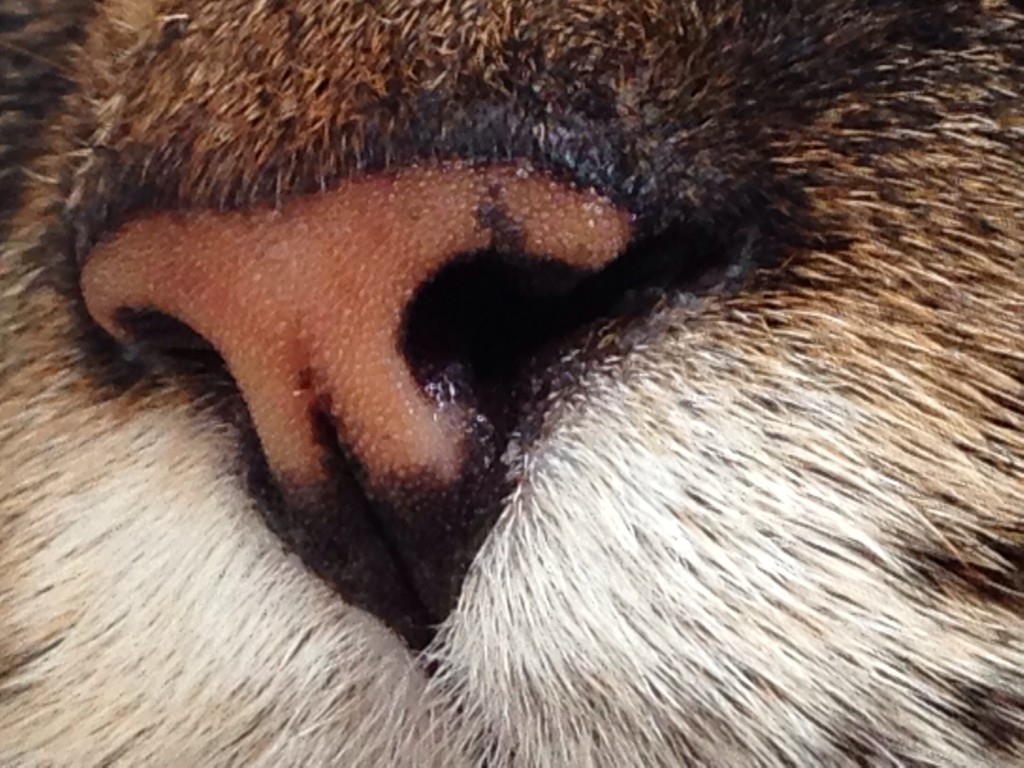
Using the Camera+ app I realized the zoom would work quite well as a macro feature. Artemis volunteered to pose so I could try it out. It is a digital zoom though so the quality does degenerate. Still, not bad for a camera on a phone…


You go Abe… You go!
“Give me six hours to chop down a tree and I will spend the first four sharpening the axe.”
—Abraham Lincoln
If there was some philosophy I could say I truly believe in then this would be it. Likely a lot of it is that I am an inveterate tinkerer and like to take the opportunity to learn new things, but mostly I think I am a bit addicted to efficiency. A process that runs smoothy and without hiccups is one that makes me smile and if I can spend 3 hours doing something interesting and learning a new skill that will carve 4 hours off a mundane and boring task ,then the outcome is guaranteed to make me grin like an idiot.
Case in point: my boating quiz. As I had mentioned previously I felt the interface for the Slick Quiz plugin sucked, and was full of redundant entry and irrelevant info that had to be entered regardless of my opinion. Since I could build a customized entry system in Filemaker in a matter of moments, it just made sense to do it my way.
That left the issue of how to get my info from Filemaker to WordPress’s quiz plugin. A quick check revealed that Slick Quiz had made a couple of tables in the WordPress MySQL database. I exported the existing data to get a sample of the table structure and then went in to Filemaker and with (a lot of) trial and error managed to create an export file that I could dump via phpMyAdmin into the correct tables. Voila!
The Point
It took me several days of playing with variables, learning software and figuring out that special characters like ampersands and curly quotes were giving me grief, before I could get the system running. I probably could have done a whole lot of data entry the hard way in those few days, but…
- I learned new software and new systems
- I learned about the nature of ‘special’ characters in a text import/export situation
- I practiced and polished my Filemaker skills, making the next project that much easier (this is the process that had led to my ability to make a better interface in the first place)
- And last, but not least, I now have a customizable system that will allow quick and efficient entry of data form weeks and months, potentially saving me hundreds of hours over the long haul.
I’m not such a big Lincoln fan generally — I tend to feel politicians are generally less altruistic than history portrays them — but I am totally on board with this little quote. Spend some time sharpening your axe people; it is almost always the right choice.
Quiz Me
I am going to try and add a quiz element to the blog. I thought I could do some studying/refreshing on boat related stuff and learn something computer at the same time. For now I will start with a plugin called SlickQuiz. I like Watu but the free version doesn’t give me randomization options and I am not forking out $75 bucks for what is essentially a one person project. The plan is to enter a whole bunch of questions from basic boat terminology to light and sound signals. I will then just break them into 10 question quick-quizzes and hopefully use them like digital flash cards to try and get some of the more esoteric stuff to stick. The entry interface to SlickQuiz sucks so I will start by building a database for question entry and then export the output to an xml file that I will import via phpmyadmin directly into the wp databases
Notes
- Must either delete the records first or change the id. XML import will not replace or update records; it will only add new.
- At this point I can’t make the xml export work straight from Filemaker so I have to copy the output file manually and past it in Text Wrangler. From there I can use phpMyAdmin to import the xml file.
The Quiz page
Movies & Conversions
I’ve posted a few things that tickled my fancy over the years and they have been in a lot of formats, .mov, .flv. .wmv, even some .swf’s. So given the rise of html 5 and a more unified mp4 system, I went back and converted most of them and have reposted them on two grouped pages:
Movies & Collected Funnies 1
and
Movies & Collected Funnies 2
Most were converted using Adobe Media Encoder CC, but for some reason the codecs for the ‘borrowed’ flvs wouldn’t allow any Adobe product to import them. So I turned to Handbrake, a lovely, lovely product; worked great.
I now also need to go and clean up the galleries as they all seem to (again) be using different formats and half of them don’t seem to work. Let me know if you find anything still broken.
Gal-LLery
I have been playing with Gallery (Gallery 3 to be exact) software since I moved to the new host. I am not sure I will leave it installed but it’s interesting to play with. For now you can visit it here macblaze.ca/gallery.
At this point, I have a public album and a private one. If you want to see the private one you have to sign in:
User: test
Password: album
This mean I could set up private albums and control the permissions via viewing. There are also supposed to be shopping basket modules and ecommerce integrations which I will be playing with next. It will also automatically watermark the images for me.
One of the things I am supposed to be able to do is integrate images from the gallery into my WP posts. See the example below:
Smooth Gallery
Doesn’t work at all
[hgallery3 id=”4,6″ render=”smoothgallery”]
Jcarousel
[hgallery3 id=”3″ render=”jcarousel”]
Seems to skip all over the place
Dir Table
I can make this work.
[hgallery3 id=”14,16″ render=”dir_table”]
Single Image
Why?
[hgallery3 id=”14″ render=”single_img”]
Dir
Again, why?
[hgallery3 id=”4,14,16″ render=”dir”]
All New & Super Speedy
Ok. As of noon, I seem to be on the new host (Stablehost.com) and everything seems to running as well as can be expected.
I don’t have my actual files uploaded yet as the ftp and webdisk seem to be super slow at uploads. I will work on it. All this means is for now there are no images that I haven’t uploaded by hand.
Let me know if things seem speedier to you’all… Or not.
Process
- I downloaded (via ftp) the entire contents of my wp-content folder to my desktop from GoDaddy’s server.
- I exported the mysql database via phpMyadmin, also to my desktop.
- I did a clean install of WordPress on Stablehost.
- I attempted to import the mysql backup on Stablehost via phpmyadmin but it kept kicking up xxx table already exists errors. eventually I deleted all the tables from the new database and tried again. THis time it imported the tables and data with no problem.
- I headed over to GoDaddy and pointed the macblaze.ca domain to Stablehost’s nameservers and about 20 –30 minutes later the redirect took affect and I was now going tot eh new server.
The issue at this point was that while I was being directed to the new server (tested by uploading a new index.html page), it wasn’t picking up the default wordpress pages and nothing was being displayed. I screwed around for about 2 hours and then suddenly it started working. I am not sure if I fixed it or there was just some cache that needed to be flushed or what.
- To get it up and running I uploaded my theme to the host and then we were cooking with bacon.
- Next up, I need to figure out how to get nearly 1 gig of old files uploaded because the 40 meg I have tried so far has taken almost 2 hours. (Turns out you need to use the file manager in cpanel. Bulk upload zipped files and extract them once they are uploaded. Speedy-speedy.)
- I also need to redirect my macblaze.ca email and we should be good to go. (Done like dinner)