Flask Part Deux
A continuation of The Great Flask Adventure.
The structure
When last we left our heroes we had posted a groovy python script: Mark III. This was saved as yacht_app.py in a folder. The rest of the files were built and also stored there. The structure of the folders is thus:
[searchyachtworld]
—yacht_app.py
—[output]
——boatlist.json (a file generated by the app)
—[static]
——
———style.css
——[images]
———artboard.png
—[templates]
——index.html
——results.html
——template.html
Back to the app
The app/python file consists of several parts which mostly consist of mini scripts to render results to a specific template. The simplest is:
@app.route("/")
def home():
    return render_template("index.html")
This simply displays the “index.html file which is a basic form. The next is:
@app.route('/results')
def results():
    data = []
    with open("output/boatlist.json", "r") as jdata:
        data = json.load(jdata)
    return render_template("results.html", boatlist=data['boats'],predata=data['fileinfo'])
This defines “results.html,” basically calling for it to open using the boatlist.json file as its data.
The next one is “index.html” after the search button is clicked and it uses a form post request to gather the input data an executes the rest of the python script using that data. I am not going to get into that as it’s just a variation of the Book Page scraping.
I did add a bit at the end that reopens the output json file and uses the submitted search parameter to reorder it before moving on to the results page.
@app.route("/", methods=['POST'])
def echo():
    #get index form data
    if request.method == "POST":
        inputcurr=request.form["inputcurr"]
        minprice=request.form["minprice"]
        maxprice=request.form["maxprice"]
        minlength=request.form["minlength"]
...
    data = []
    with open("output/boatlist.json", "r") as jdata:
        data = json.load(jdata)
        data['boats'].sort(key=keyparam)
    return render_template('results.html', boatlist=data['boats'],predata=data['fileinfo'])
Back to the HTML
Flask uses the template.html file to set all the default elements (header, navbar, styles sheets etc.)
I won’t bother with the code for the index page, but here is the results which is pretty simple. Basically extracting the header information form the “predata” section of the json and then a loop though the “boatlist” to display each boat.
<!DOCTYPE html>
<html lang="en">
<head>
    <title>Yachtworld Results</title>
</head>

<body>
{% extends "template.html" %}
{% set active_page = "results" %}
{% block content %}
<div class="page-header">
    <h2 class="orange">YachtWorld Results</h2>
    <div id="preface">
        {% for pb in predata %}
    <div>
        <p>{{pb.Text}}<br/>Updated: {{pb.Date}}
        <br/><a href="{{pb.Creator}}">created by {{pb.Creator}}</a></p>
        <p>Price range : <strong>${{pb.Low}} </strong> and <strong>${{pb.High}}</strong> (${{pb.Currency}})<br/>
        Boat length: <strong>{{pb.Short}}'</strong> – <strong>{{pb.Long}}'</strong></p>
    </div>
    {% endfor %}
    </div>
    {% for boat in boatlist %}
    <div class="col-xs-6" style="min-height:170px;">
        <div class="col-md-5 text-right ">
            <img src="{{boat.Thumb}}" alt="" width="150px">
        </div>
        <div class="col-md-7">
            <h3><a href="{{boat.URL}}">{{boat.Name}}</a></h3>
            <p><strong>${{boat.Price}} </strong> / {{boat.Size}}</br>
            {{boat.Location}}</p>
        </div>
    </div>
    {% endfor %}

{% endblock %}
</body>
</html>
Pretty simple really…lol.
In conclusion
Anyway I don’t suspect anyone will actually understand/get much out of all this and its here mostly for posterity. There are plenty of resources online to help dig into the code.
I am still playing with it and it will continue to evolve. I did post it on github if anyone is interested in the latest version (I have already added in some bits to handle price errors). I am still searching for host to make it publicly available but anyone can download it from Github if they want to run it on their own server.
Instagram This Week


#screenprinting #fail #stupidvirus
The Great Flask Adventure
I just published a blog post over on neverforever.ca about trying to build a web app to scrape YachtWorld. I thought I would record the details here so I can remember what I have done. The complete (and updated) repository is on github if anyone is interested.
Why?
Some time in the recent past YachtWorld decided to redo their website. And one of the outcomes of that is that you can no longer search for boats in multiple places at the same time and, I now had to perform three separate searches with no way to “save” a previous search and be able to compare. I figured I could adapt my newfound python skills and scrape the site and deliver output to the website.
Mark I
I copied my previous efforts and produced a python script that produced a markdown file to view on a webbrowser.
Mark II
I decided to output a JSON file instead and then build a php page to read it using JQUERY and Javascript. The json format had two dict, one for general info and one for boat listings:
{
"fileinfo": [
{
"Date": "April 03, 2020 08:46",
"Text": "Results are a Yachtworld search of sailboats in Washington, Oregon and B.C.",
"Currency": "CAD",
"Low": "30000",
"High": "120000",
"Short": "34",
"Long": "48",
"Creator": "http://neverforever.ca"
}
],
"boats": [
{
"URL": "https://www.yachtworld.com/boats/1980/cheoy-lee-clipper-42-ketch-3577567/",
"Name": "Cheoy Lee Clipper 42 Ketch",
"Price": "80,000",
"Size": "42 ft / 1980",
"Location": "Vancouver, British Columbia, Canada",
"Thumb": "https://newimages.yachtworld.com/resize/1/16/77/7191677_20190822081237806_1_LARGE.jpg?f=/1/16/77/7191677_20190822081237806_1_LARGE.jpg&w=520&h=346&t=1566486758"
}
]
Then I used javascript to retrieve the data and loop through “boats” to display the html code.
/*Retrieve Listings*/
var data;

jQuery.get("boatlist.json", function(d) {
data = d;

/*numeric (price) sort
var datab = data.boats.sort(function(a, b) {return parseFloat(a.Price.replace(/,/g, '')) - parseFloat(b.Price.replace(/,/g, ''))});
*/

/*text (length) sort*/
var datab = data.boats.sort(function(a, b){
var x = a.Size.toLowerCase();
var y = b.Size.toLowerCase();
if (x < y) {return -1;}
if (x > y) {return 1;}
return 0;
});

// loop through all boats
datab.forEach(function(bb) {
// now put each boat in a <div>
$("#boats").append(`
<div class="col-xs-6" style="min-height:170px;">
<div class="col-md-5 text-right ">
<img src="${bb.Thumb}" alt="" width="150px">
</div>
<div class="col-md-7">
<h3><a href="${bb.URL}">${bb.Name}</a></h3>
<p><strong>\$${bb.Price} </strong> \/ ${bb.Size}</br>
${bb.Location}</p>
</div>
</div>
`);
});
});
It worked pretty good but relied on me running the python script each time. After a bit of investigation I decided to turn to Flask to see if I could host it all on a website. Since the Calibre-Web site that I was scraping for my Books Read project ran on Flask I knew it could be done.
Mark III
So here is the script I finally ended up with
from flask import Flask, render_template, request, jsonify
import json
app = Flask(__name__)
@app.route("/")
def home():
return render_template("index.html")
@app.route('/results')
def results():
data = []
with open("output/boatlist.json", "r") as jdata:
data = json.load(jdata)
return render_template("results.html", boatlist=data['boats'],predata=data['fileinfo'])
@app.route("/", methods=['POST'])
def echo():
#get index form data
if request.method == "POST":
inputcurr=request.form["inputcurr"]
minprice=request.form["minprice"]
maxprice=request.form["maxprice"]
minlength=request.form["minlength"]
maxlength=request.form["maxlength"]
texta= minlength + "–" + maxlength +"ft\n" + inputcurr +": $" +minprice + "-" + maxprice
textb= minlength + "–" + maxlength +"ft<br/>" + inputcurr +": $" +minprice + "-" + maxprice
# build sort param ie data['boats'].sort(key=lambda s: s['Location'])
sortparam=request.form["inputsearch"]
if sortparam == 'Location':
keyparam = lambda s: s['Location']
elif sortparam == 'Price':
keyparam = lambda s: int(s['Price'].replace(',', ''))
elif sortparam == 'Size':
keyparam = lambda s: s['Size']
# import various libraries
import requests
from bs4 import BeautifulSoup
import re
#enable math.ceil
import math
# enable sys.exit()
import sys
import csv
import json
from datetime import datetime
import os
# set header to avoid being labeled a bot
headers = {
'user-agent': 'Mozilla/5.0 (X11; Linux x86_64) AppleWebKit/537.36 (KHTML, like Gecko) Chrome/67.0.3396.99 Safari/537.36'
}
# set base url
baseurl='https://www.yachtworld.com/boats-for-sale/type-sail/region-northamerica/'
# input low number
if minprice == '':
minpricenum = '30000'
else:
minpricenum = minprice
print(minpricenum)
# input high number
if maxprice == '':
maxpricenum = '120000'
else:
maxpricenum = maxprice
print(maxpricenum)
# input currency
if inputcurr == '':
curr = 'CAD'
else:
curr = inputcurr
print(curr)
# input low length
if minlength == '':
lowlen = '34'
else:
lowlen = minlength
print(lowlen)
# input high length
if maxlength == '':
highlen = '48'
else:
highlen = maxlength
print(highlen)
# set variables
pricerange = '&price=' + minpricenum + '-' + maxpricenum
wash = 'country-united-states/state-washington/'
oreg = 'country-united-states/state-oregon/'
bc = 'country-canada/province-british-columbia/'
currlen = '?currency=' + curr + '&length=' + lowlen + '-' + highlen
# create list of url variables
urllist=[bc,wash,oreg]
#check to see if external drive is mounted and mount it
#if os.path.ismount("/Volumes/www/") == False:
# print ("False monkey")
# os.system("open smb://admin:Sally1@Mini%20Media%20Server._smb._tcp.local/www")
# set path to export as file
path_folder="output/"
# set date and time
now = datetime.now()
dt_string = now.strftime("%B %d, %Y %H:%M")
# create empty list
arrayjson = []
#loop though pages in urllist
for page in urllist:
# get url
urlpath = baseurl+page+currlen+pricerange
page = requests.get(urlpath, timeout=5)
boatpg = BeautifulSoup(page.content, "html.parser")
# find boat listings section
boatlist = boatpg.find('div', class_="search-right-col")
#find single boat listing
boatlisting = boatlist.find_all('a')
#loop though listing and append to list
for listname in boatlisting:
nameurl = listname['href']
thumb = listname.find("meta", property="image")
#add https and find content of meta and substring url to remove first two characters
thumburl="https://" + thumb["content"][2:]
name = listname.find('div', property="name")
priceraw = listname.find('div', class_="price")
#remove extra info from front and back
price = re.search("\$.*? (?= *)",priceraw.text)
cost = price.group()[1:-1]
sizeyear = listname.find('div', class_="listing-card-length-year")
location = listname.find('div', class_="listing-card-location")
#write to json format
writejson = {
"URL": nameurl,
"Name": name.text,
"Price": cost,
"Size": sizeyear.text,
"Location":location.text,
"Thumb": thumburl
}
# append to list
arrayjson.append(writejson)
#add Preface list (array)
arraypreface = []
preface = {
'Date': dt_string,
'Text': 'Results are a Yachtworld search of sailboats in Washington, Oregon and B.C.',
'Currency': curr,
'Low': minpricenum,
'High': maxpricenum,
'Short':lowlen,
'Long': highlen,
'Creator': 'http://neverforever.ca'
}
#append to list
arraypreface.append(preface)
# open json file with path
with open(path_folder+'boatlist.json', 'w') as outfile:
#dump two lists with dict names and add formatting (default=str solves date issue)
json.dump({'fileinfo': arraypreface, 'boats': arrayjson}, outfile, indent=4, default=str)
data = []
with open("output/boatlist.json", "r") as jdata:
data = json.load(jdata)
data['boats'].sort(key=keyparam)
return render_template('results.html', boatlist=data['boats'],predata=data['fileinfo'])
Continued: Flask Part Deux…
If you can’t boat, dream…
As is almost everyone in the world right now, we are stuck and are having difficulty even imaging getting out on the boat in the foreseeable future. So to amuse myself I have been looking online for that future “forever” boat.
Who am I kidding; I am always looking online at boats. But what I have done is work on a project that fixes an annoyance of mine.

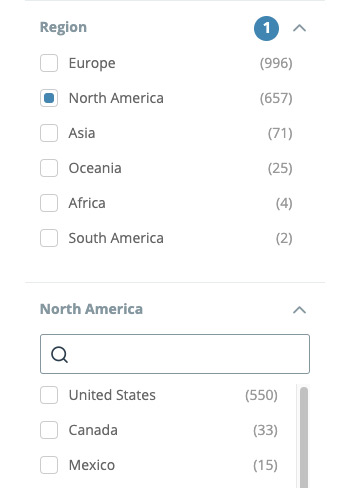 Some time in the recent past YachtWorld, which is the de facto standard for listing boats, decided to redo their website. And one of the outcomes of that is that you can no longer search for boats in multiple places at the same time. And seeing how I desire to buy a boat in the PNW (which used to be a selectable search category) and the PNW ostensibly includes British Columbia, Washington state and Oregon, I now had to perform three separate searches with no way to “save” a previous search and be able to compare. A definite downgrade if you ask me.
I had recently started to learn how to scrape websites using python because I wanted to be able to post a “books read” page on my personal site. Web scraping is a method of visiting a site and stripping the data from it. It occurred to me that I could apply the same procedure to YachtWorld and retrieve and aggregate all three searches to one output. So off I went.
Building
 My initial method was to build a python script that output the data to a php web page. After a lot of trial and error it worked. But this meant every time I wanted to do a new search I would have to run the terminal command again and enter in the price range (which were the only variables I included). This produced a database file which the php page could then display. This was pretty onerous, particularly because I kept forgetting the proper commands :-). I also held out some hope that eventually I could share this with other people. There had to be a better way.
So I investigated further and discovered Flask, which is—simplistically put—a way to turn a python script into a web app. After a lot of fiddling (which I will detail soon over at macblaze.ca) I came up with this:
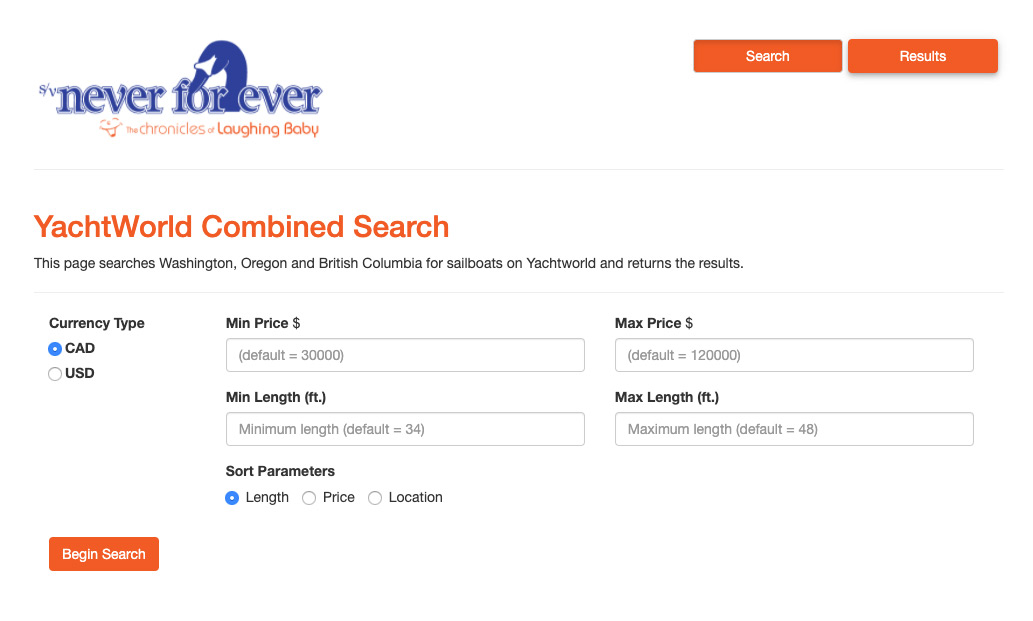
The new version added the options for Canadian vs. U.S. currency and length and the ability to sort the results. It is all one compact, self-contained unit and works 100% from a web browser. The search returns most of the details of the boats and links back to the official YachtWorld result so you can dive deeper into any particular boat. If you ask me it turned out pretty good.

A qualified success.
Deployment
I am stuck now though. It currently runs on my testing server and when I went looking to deploy it, discovered that my official web host doesn’t provide python support. I would either have to switch providers or get an additional (paid) account at another web host. I did find pythonanywhere.com, which offered free, albeit limited, python/flask hosting and was excited for the full hour it took to set up and get it running. You can find it here (http://btk.pythonanywhere.com/) but unfortunately the free accounts won’t let you scrape websites that don’t have official api’s (application programming interface)—which YachtWorld does, but it isn’t free so I don’t have access to it. So while the app is running it won’t actually deliver any results.
So now I am faced with the choice to either open up my testing server to the world (which I am not likely to do), change providers (and I just paid for the next couple of years) or sit on my little project and declare it for personal use only. I haven’t given up yet, but the prospects look dim.
So…
So here I sit, a vast distance from the boat and any prospect of cruising and a weeks worth of work sitting on a computer with no way to share. And I am now getting tired of running the search over and over again. Sigh.
Anyway, if any of you experience the same frustration with YachtWorld, I sympathize and want you to know that there is a way around it with a bit of time and even less knowledge—which is something we should all have in abundance right now.
—Bruce #Purchasing
Instagram This Week


Instagram This Week
Instagram This Week


#yeg #yegymca
What kind of cruiser?
Bored of the lack of thoughtfulness and reading comprehension on a cruising forum I frequent I post the following post (the original post). I got some good feedback on my attempt at humour so I thought I would repost it and a few of my follow-up posts…
Warning: the following is mostly tongue-in-cheek, although there is an underlying truth to the issue.
It seems to me that many of the discussions on CF go off the rails because we are all so different in both our ambitions and realities. “How much does it cost to cruise?” You’d think this was a pretty straightforward question but it really isn’t and the topic generally goes sideways faster than a drunken docking attempt on a windy day. Even seemingly innocuous discussions like “How much chain do I need in such-and-such area” often become completely nonsensical because no one can agree on what we are actually talking about.
It seems to me we all stubbornly live in our own bubbles. Of course he means to be on the hook 99% of the time! vs. No sensible person would ever anchor out if there was a marina nearby! is never considered when joining the discussion—we just dive in and start the pontificating.
So I propose we find a solution.
I started with a simple chart. “That,” I said to myself, “would solve everything.” “It’s simple Self,” I said, “Simply find your place on the chart and colour code your answers so as to clear up any potential misunderstandings with all our fellow CFers.”

But then I got to thinking. It just wasn’t enough. Where was the geography? We needed a plane for warm vs cold, anchorages vs moorings… And what about round-the-world vs regional? Or a scale for single-handers all the way up to large crew?
(I tried to make a chart—it turned into a disaster )

This was getting complicated. So maybe a chart is out. How about codes?
Crew size |Crew Period |Climate | Expenses | Area | Moorage Style etc.
So for example I would be a 2PTCMRA (2 crewed, part-time, cold-water, moderate spending, regional anchorer). We could have a big chart … or an app…this is a great opportunity for an app developer—wait…ummm, we need a code for electronics too, with sub codes for radios, GPS, trackers, weather systems… hmmm…
So… ya. A chart. A BIG chart! We will need codes for anchor types too, and gun preferences, probably sub charts for specific regions cause we all know that the Med is different kettle of fish than the Caribbean— I mean literally, totally different fish and what we have here in the PNW is obviously so much better than anywhere else so…but I digress.
We will need indicators for partiers, outgoing folk, introverts, singles, people who can rebuild transmissions blindfolded, those who are still unsure what the pointy bits on a hammer are for… Oh, and most especially some way to differentiate where we fall on the scale of way over-prepared to “I bought a boat on the internet and cast off tomorrow—can someone show me how to sail?”
I guess we need a code for sailing purists. And one for those of us who have a funny stick in the middle of our powerboats. And racers. And dock-bound liveaboards. Is specifying whale preferences going too far? I like orca myself. What the hell let’s add it in.
So now would start any thread participation with “I am a 2PTCMRAPNWNGIMIEMPSO…” and as a result any potential misunderstandings would immediately be averted.
Ok so that about covers it. I am starting to grid this out and will announce the official chart when its completed and will have to get the mods onboard to enforce total compliance. Won’t work otherwise and this would have been a total waste of effort. Hmmm, I guess we will have to access penalties as well. Maybe a grid to determine just how serious breaches, cases of mis-information, and what the levels of incompleteness are and empower Guardians of the Grid to deliver appropriate punishments. That can be phase 2.
This is going to be so cool!
Or… I guess… We could…I mean… Maybe…
Could we all just take a moment to thank god (and/or whatever diety, spirit or scientific principle you believe in) that we are all able to get out on the water in whatever way we can and that that is a whole lot of different ways?
Seriously, if we all just took a moment to consider an OP’s situation or even a fellow thread participant’s perspective there would be so many fewer stupid, inadvertent pissing contests. And then we could get on with the intentional ones.
Just a thought. Let me know if you still want me to go ahead with the grid idea.
The thread continued. Both Mike O’ and L independently thought Venn diagrams were the way to go:
Maybe what you need is a series of Venn diagrams. Cruisers are liveaboards, but not all liveaboards are cruisers. Racers and cruisers overlap, but some are just racers, and some are just cruisers. Some cruisers anchor out, some marina hop, and some do both.
So I gave this a try:

Then Wolfgal suggested:
What fun, Macblaze! Your ever-growing charts are so complicatedly fun! a holograph chart that actually turns around in space, popping up from my personal R2-D2 would take your idea to the next level. could you do this?. 
I thought, I can do that…
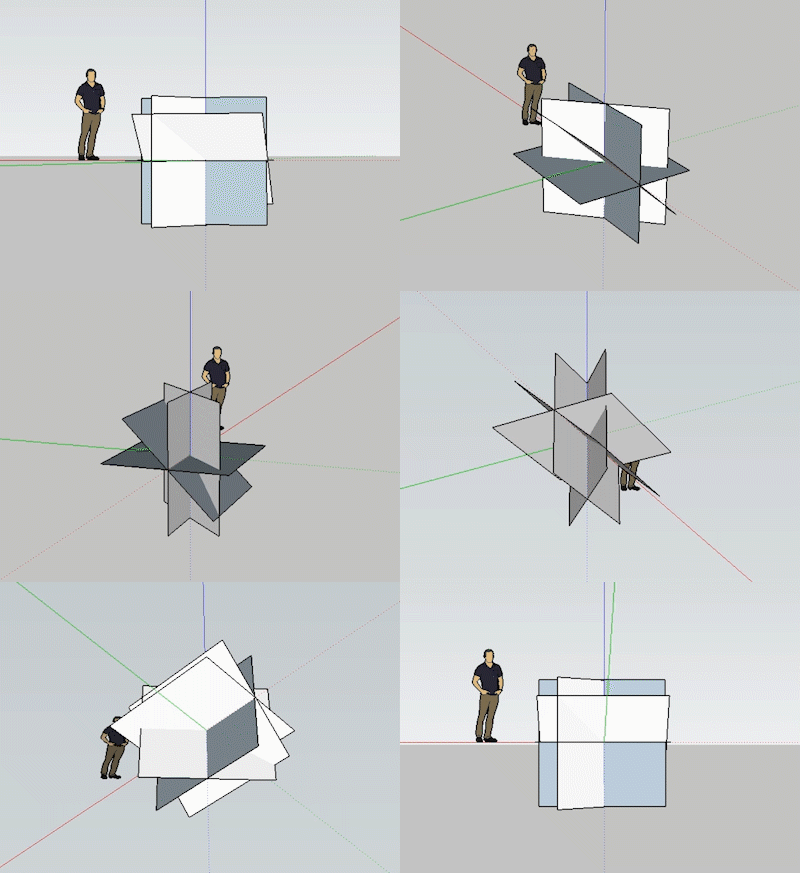
I almost lost control of the whole idea when Tayana42 tried to outsmart me with:
Curiosity
Reigns
Until
I’ve
Seen
Enough
Or
Casually
Roving
Upon
Iceless
Seas
In
No
Great hurry
Clever, clever! It went on for pages and pages after that.
Instagram This Week

Instagram This Week