Category: Computers
Making a “Books Read” page
So recently I came across a web page called How I manage my ebooks by a fellow named Aleksandar Todorovi. He is a developer who wanted to track his reading on his webpage. He introduced me to a Calibre project called Calibre-Web which is basically a web interface for Calibre with a few extra bells and whistles. Reading through his explanation it seemed pretty simple to implement except for this statement:
As a final step in the chain, I have created a script that allow me to publish the list of books I’ve read on my website. Since Calibre-Web doesn’t have an API, I ended up scraping my own server using Python Requests and BeautifulSoup . After about one hundred lines of spaghetti code gets executed, I end up with two files:
books-read.md, which goes straight to my CMS, allowing me to publicly share the list of books I have read, sorted by the year in which I’ve finished reading them.…
The Process
So I set about to try and implement my own version of Aleksandar’s project. In my typical trial and error fashion it took a couple of days of steady work and I learned a ton along the way.
Calibre-Web
I went ahead and downloaded Calibre-Web and wrestled getting it running on my test server (my old mac-mini). It is a python script, which I still a bit fuzzy about the proper way to actually implement. I ended up writing a shell script to run the command "nohup python /Applications/calibre-web-master/cps.py" and them made it executable from my desktop. I still have some work to do there to finalize that solution.
I have to say I really like the interface of Calibre-Web much more than the desktop Calibre and although there are a few quirks, I will likely be using the web version much more than the desktop from now on.
Then I made a few shelves with the books I had read in 2019 and 2020 and was good to go. Now I just needed to get those Shelves onto my website somehow.
Web Scraping
Now I’ve never heard of the term web scraping, but the concept was familiar and it turns out it is quite the thing.
Web scraping, web harvesting, or web data extraction is data scraping used for extracting data from websites
—Web scraping, Wikipedia
The theory being that since all the info is available accessible in the basic code of the Calibre-Web pages, all I needed to do was extract and format it, then repost it to this site. So I did. Voila: My Books Read page.
I guess I skipped the tough part…
Starting out I understood Python was a programming language, but had no idea what Python Requests or BeautifulSoup were. Turns out that Python Requests was essentially one of many “html to text” interpreters and BeautifulSoup was a program (library?…I am still a bit vague on the terminology) to extract and format long strings of code into useful data.
Start with Google
I started by a quick search and found a few likely examples to follow along with.
https://medium.com/the-andela-way/introduction-to-web-scraping-87edf94ac692
https://medium.com/the-andela-way/learn-how-to-scrape-the-web-2a7cc488e017
https://www.dataquest.io/blog/web-scraping-beautifulsoup/
These were helpful in explaining the structure and giving me some basic coding ideas, but I mostly relied on https://realpython.com/beautiful-soup-web-scraper-python/ to base my own code on.
Step one
I got everything running (this included sorting out the mess that is python on my computer, but that is another story) and tried to get a basic python script to talk to my calibre installation. Turns out that even though my web browser was logged into Calibre-Web, my script wasn’t. Some some more googling found me this video (Website login using request library in Python) and it did the trick to write the login portion of my script.
Step two
Then I wrote a basic script that extracted data (much more on this later) and saved it to a markdown file on the webserver. I figured markdown was easier to implement than html and knew WordPress could handle it.
Or could it? Turns out the Jetpack implementation was choking on my markdown file for some reason. I fought with it for a while and eventually decided to see if I could find a different WordPress plugin to do the job. Turned out I could kill two birds with one stone using Mytory Markdown which would actually load (and reload) a correctly formatted remote .md file to a page every time someone visited.
Step three
After I got a sample page loaded on the website I realized that it was missing pub date and series name which, if you have ever visited one of my annual books read posts (Last Books of the decade: 2019, Books 2018—Is this the last year? etc.) is essential information. So I had to go into the Calibre-Web code and add those particular pieces of info to the shelf page so I would be able to scrape it all at the same time. I ended up adding this:
{% if entry.series|length > 0 %}
    <p class="series">
        {{_('Book')}} {{entry.series_index}} {{_('of')}} <a href="{{url_for('web.books_list', data='series',sort='abc', book_id=entry.series[0].id)}}">{{entry.series[0].name}}</a>
    </p>
{% endif %}


{% if entry.pubdate[:10] != '0101-01-01' %}
    <p class="publishing-date">{{entry.pubdate|formatdate}} </p>
{% endif %}
…to to shelf.html in /templates folder of the Calibre-Web install. I added it around line 45 (just after the {% endif %} for the author section). It took a bit of fussing to look good but it worked out great.
Step four
Now all I have to do is figure out how to run my scrape.py script. For now I will leave it a manual process and just run it after I update my Calibre-Web shelves, but making that automatic is on the list for “What’s Next…”
Ta-da
So between this post and Aleksandar’s I hope you have a basic idea of what you need to do in order to try and implement this solution. More importantly when future me comes back and tries to figure out what the hell all this gobbledey-gook mess is I can rebuild the system based on these sketchy notes. I will end this here and continue in a new post on the actual python/beautifulsoup code I came up with to get the web scraping done.
Computer Doings
I had recently discovered that my old copy of Filemaker Pro 12 wouldn’t run on my main computer (Macbook Pro OSX 10.14 Mojave) since my latest round of upgrades and it kept crashing on my old Mac Mini server (10.13 High Sierra). I don’t use Filemaker for much anymore but I do have two databases that get used about once a year: a boating log and a Blackboard quiz maker. The quiz maker wasn’t important but I had all my sailing resume stored in that Filemaker database. So it looked like I had a bit of a problem.
But every problem is just a new opportunity. I decided to break down and actually learn how to use Mysql and php. I’ve dabbled. This website (and most of my other sites) is run on WordPress and that is based on Mysql/php—so any modifications I’ve done to them have definitely danced around the edges.
Mysql is an open source database related to the professional standard SQL database. Sort of a linux to unix relationship, although not really. Php is a scripting language for web development. Since mysql has no interface, php is used to bridge the gap and provided a web-based GUI to access the database. My Mac Mini has a testing version of mysql/php I use for my own wordpress work so that was set. All I had to download was a gui to help me see what it was doing. I settled on Mysql Workbench which is the “official” mysql gui.
I started here: tutorialrepublic.com/php-tutorial. Eventually I got to the section about CRUDs (an acronym for Create, Read, Update, and Delete) and then dumped all my work to date to make my own crud and use it to develop the Blackboard quiz as a test project. Then it was a week of learning, trial and error and discovery. I even had to delve into javascript which was a whole other learning curve.

Javascript..Oh MY!
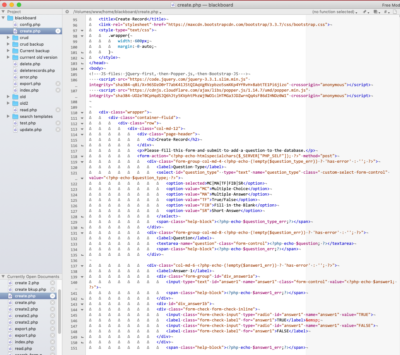
At the end of the day I got it 90% there. There are still some issues with error checking and security. It really isn’t ready for use in the wild, but then again I doubt any of my Filemaker DBs ever were either. But it works and we are setting up for a live test to see if it’s actually practical for L to use.
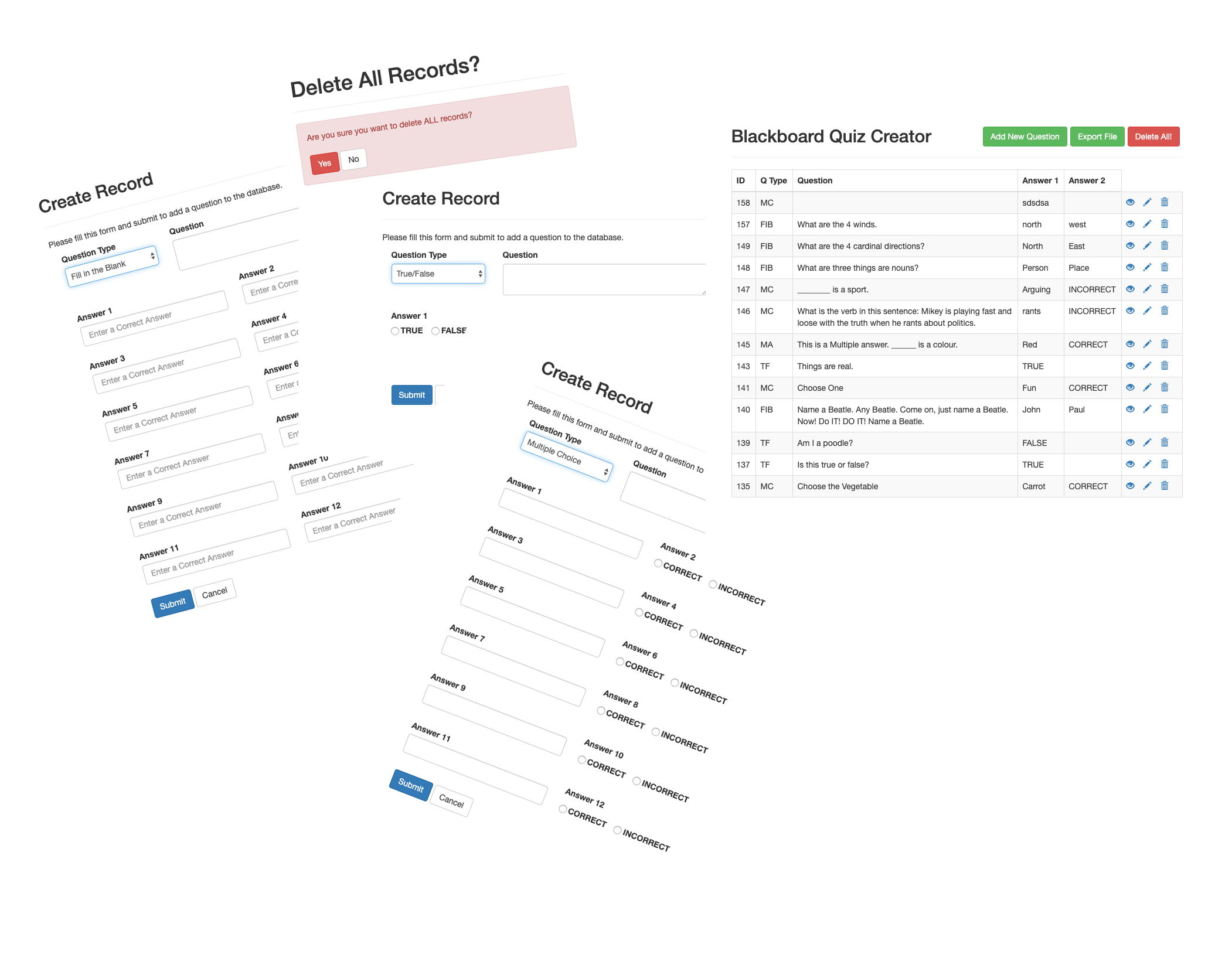
Features
Some things I managed to add to the crud tutorial:
- changing the placeholder text in a field based on the question-type dropdown menu
- changing input types (box, radio buttons etc.) with defaults based on question type
- export to tab delimited file, with ability to choose file name
- javascript loops through variable names so I didn’t have to repeat the same code for all 12 possible answers
- ability to delete all records with error checking
- and a few other tweaks
I also learned about Bootstrap. Which was so cool. Wikipedia says:
Bootstrap is a free and open-source CSS framework directed at responsive, mobile-first front-end web development. It contains CSS- and (optionally) JavaScript-based design templates for typography, forms, buttons, navigation and other interface components.
…
Bootstrap, originally named Twitter Blueprint, was developed by Mark Otto and Jacob Thornton at Twitter as a framework to encourage consistency across internal tools. Before Bootstrap, various libraries were used for interface development, which led to inconsistencies and a high maintenance burden.
…
It was renamed from Twitter Blueprint to Bootstrap, and released as an open source project on August 19, 2011.
I certainly appreciate the way it makes for a beautiful looking website without much effort. And it’s something more to learn…
What’s Next
As a result of all this I am going to attempt to recreate my much more complex Boating Log DB. And the realization that I need some “official” training rather than just the hit and miss, trial and error, flavoured with random googling method that characterizes so much of my computer work. So the next step is to find some courses…
ebook Update
As a side project in late 2018 I started to produce ebooks for Standard Ebooks. Details about that can be found here on this older post.
My ebooks so far…
So here is the complete list of the books I have worked on so far, including the last 3 that have yet to be approved, but will likely be posted in a week or so…


And so…
The Mack Reynolds text is my first collection. A great read of most of his short stories and novellas by an under-appreciated sci-fi author. I did very little of the textual work on the William Carlos Williams book as poetry is not my jam, but I convinced Dr. L to collaborate, so I did the code work and she stepped in as editor. Those two and the Shakespeares have proven to be great learning experiences both in ebook coding and how texts have been handled over the centuries; seriously after almost finishing a Masters degree in renaissance drama, I am astounded about how much minutia I didn’t know about source texts and four centuries of editing practice.. Hope you give some of them a try. I also try to keep a current list of books over at astart.ca/coding/ebooks.
Websites I have known and loved, Or…
…The stupid amount of websites I have
Over the years I have, for no particular reason, managed to accumulate a collection of websites that I manage. And don’t get me started on the number of email addresses I have (at last count it was 7 active ones give or take). My hosting package doesn’t put a limit on how many sites I host, so I have never been reluctant to add another…none of them get much traffic in the big scheme of things anyway so why not.
So I thought I would collect all the websites I currently host/manage here and add a brief raison d’être. Chronologically I think. Why? For no particular reason…
moreblaze.blogspot.com
It is hard to remember which came site actually first. But the first post on this Blogger website was November 29, 2002 at 4:21 so I guess it must be the winner.
Hi
Welcome to the Blog…
Hopefully this will house the daily diaries of (B)ruce (L)eslie (A)nd (Z)ak’s (E)lectronic (BLAZE) lives. Come back and visit whenever…

I used it for a few months and then abandoned it. Something about trusting a third party to house all my info didn’t sit right. And given the number of web services that have come and gone I think I was right. Blogspot fortunately was purchased by Google and remains a viable service to this day. Abandoned by me, unused by Z, it quickly became L’s home on the web and she posts to it every few months or so. About once every couple of years I come by and screw with the design or logo. It is one of two sites who’s content isn’t under my direct control.
macblaze.ca
You are here.
The first post I can find is September 1, 2005.
Geek Post
Trials of being an incompetent geek
As you can see I installed Blojsom on the server and am now hosting my own blog. Currently running a Ruby g3 iMac with OS x Server 10.3.9 and hosting this website, some mysql stuff and now the blog.
Installing the Blojsom was as easy as they say on one had and weird on the other. You are supposed to download the WAR file and install it in the Tomcat director and voila.
Easy you say, and it is if that’s all there was to it. To start with the download kept giving me a .jar file which was new to me. Fix: download on the PC and then move the WAR file over to Ruby…
As you can see from the content it wasn’t actually the first iteration of this blog, but it is all that remains. There are also a number of posts on the blog that have dates in the 90s, but that is because one day I sat down and typed in all my bad poetry from over the years and backdated the posts to when they were actually written. Be that as it may, it has been my online home for 15+ years with on again/off again attention being paid to it.

I initially ran it on my own home server and eventually moved on to a variety of hosting services. It has gone through a bunch of redesigns and I try to do all the coding myself to keep my hand in. At last glance it was over 3 gig to backup so it is pretty hefty these days. It will remain my online home for pretty much forever I guess.
Oh, and the name? Well as seen in the first entry,(B)ruce (L)eslie (A)nd (Z)ak’s (E)lectronic… was an early online identity. About that time I also started an email account and couldn’t get blaze as the address so decided to use macblaze instead. And it stuck. So since I was hosting this site on my mac, when I started using a dns forwarder, I snagged macblaze.hopto.org as the url. In 2009 I finally shelled out and bought macblaze.ca and moved it all to that. And here we are.
astart.ca
Eventually I found myself changing jobs and realized I had no place to showcase my professional stuff. I had been working with a few colleagues who were in the same boat and thought maybe we needed someplace where we could show off our fresh start. So I bought astart.ca.

As these things go, a home for our collaboration didn’t emerge as a necessity and so the domain lay dormant until I picked it up and started adding stuff. I think the first big push was when I applied for a design job and realized that I had no portfolio. I quickly stuffed a bunch of stuff into a wordpress template and went off to my interview.
Over time I have played around with the site, adding first stained glass and then my ebook projects, but it really is the neglected child. A complete revamp is on the to do list, but I will need to get one of those elusive ’round tuits.”
neverforever.ca
And then we went sailing. And if you have a sailboat, you have to have a blog right? As soon as we settled on a name for our new boat, I bought neverforever.ca and started adding content. Of all my websites, it gets the most traffic (nothing major though) and I probably have spent the most effort there over the last 3 or 4 years.
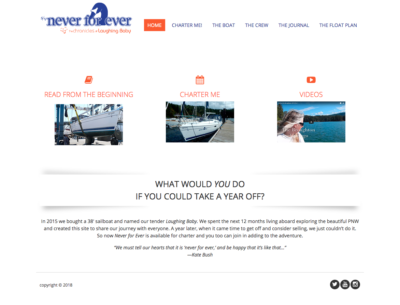
I have a few committed followers and even get some unsolicited comments once in a while. I mainly set out to make a home for all our learning experiences and hope that the readers I do get learn something about noobs buying a boat, and perhaps make their boat-buying experiences easier.
theboozephiles.com
When we returned from cruising a friend of ours proposed starting up a weekly cocktail tradition and boozily working our way through the wonderful world of high-class hooch. How could we say no? So we started whipping up cocktails every week, taking some pictures and writing up our experiences. As of today there are 102 different cocktails ranging back to the 1890s, with recipes, photographs and our impressions.
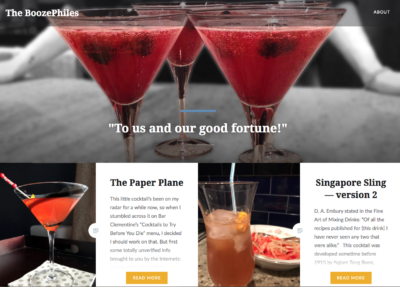
Life has gotten busier so we rarely manage to hit our weekly schedule anymore but we are still experimenting, drinking and posting as our schedules allow. Check it out if you are looking for some booze ideas. We also have an Instagram stream: @theboozephiles
readingwithapencil.com
 In 2015 L wrote a book. It’s great…you should buy it!
And when it came out we realized she need a home for her professional maundering an authorial web presence. For some reason—I can’t really remember why…maybe tax reasons?—we decided to host it on wordpress.com. It is the second website who’s content is out of my direct control, but I have all the original content so I am less paranoid about it.
And yes, she does read with a pencil (and a pen).
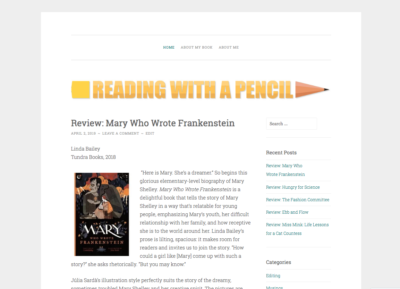
The site hosts L’s bio, links to the book, some of her writings and a whole passel of YA and children’s book reviews. Looking for a good book for your kids? Check it out… And she’s got another book under contract so eventually that one will be added to the site as well. And it is sadly overdue for a complete redesign as well. You can follow Reading with a Pencil on Facebook too!
Speaking of neglected children
beakerwood.ca
I made this site one day after spending the Xmas holidays with the family. My brother has been making and selling woodwork under the Beakerwood brand for a decade. But he had no web presence. So as a gift, I bought the domain and whipped up a site for him.

It was a bit more content-rich at one point but has fallen into disrepair. I went through and cleaned it up last year and it remains now as not much more than a splash page and contact info. He has gotten a few sales off it but not much. A project for the future…
littlefirecreative.ca
This is a friend’s site. Again, we were looking to create a more active business with an online presence but reality (and work) got in the way. Still it remains as a contact page for any freelance work that might come up. Looking for an editor? Art director? I can highly recommend you start here.

reluctantlyyours.com
 This last one is currently not much more than a domain name and a placeholder image. I threw it up after a friend said they had purchased the domain with a unique idea in mind. It turned out it was an idea who’s time has not yet come—but it will… oh yes, it will!
Teh is The Answer
For some reason Chrome has never wanted to suggest any other possible spellings for the word “teh.” I almost always misspell it when I am typing fast and it is pretty damn annoying since Chrome completely ignores OS X’s language preferences—so I can’t turn on Substitutions—and screwing with the OS X dictionary was useless. So every time I go back through to proof a document (especially here in WordPress) and although Chrome will identify it as an error, I can’t just right-click and correct the offending teh like every other word I mistype:
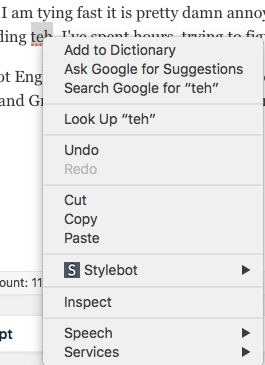
I’ve spent hours trying to figure it out and I finally managed it today. It seems I didn’t have a dictionary enabled. I’ve got English, US and English, UK selected in Chrome’s preferences but that never did any good. You need to go to Edit: Spelling and Grammar: Show Spelling and Grammar: and instead of Automatic by Language, change it to something else.
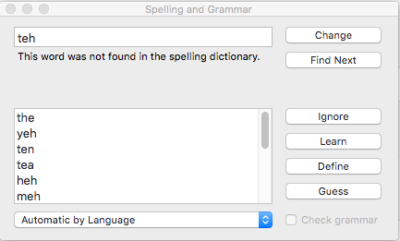
Turns out if I change that to Canadian English:

Then voila! Right-clicking now yields the proper suggested spellings.
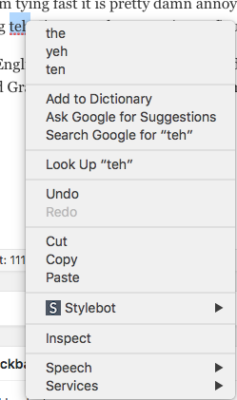
Mystery solved. After too many years.
Addendum
So here we are a week later and teh is no longer being suggested as a correction! WTF mate? So I went back and checked, and sure enough Chrome had moved the language back to Automatic by Language. A quick selection of Canadian English and we are back in business. But why? Was it an update somewhere along the way? I will have to keep an eye on it…
Addendum to teh Addendum
June 7th and the bloody thing has forgotten its dictionary again. Another quick reset back to Canadian English and we are good to go. I guess now I have another problem to investigate.
ebook creation
As a side project in late 2018 I started to produce ebooks for Standard Ebooks. I had been wanting to broaden my knowledge of epubs so I went casting about the internet for some good starting places. And I stumbled across this project:
Standard Ebooks takes ebooks from sources like Project Gutenberg, formats and typesets them using a carefully designed and professional-grade style manual, fully proofreads and corrects them, and then builds them to create a new edition that takes advantage of state-of-the-art ereader and browser technology.
 It sounded perfect. And the addition of current semantics and web standards in construction also allow them to be more accessible which was something I had also been looking into. Volunteers pick a book project and after the redesign of the base code, they are modernized, proofread again and issued on the Standard Ebook website in multiple formats. And the whole system is also setup to allow maintenance after publication with fixes and updates by both the original producer and readers at large using GitHub. I would absolutely recommend that if you are thinking of downloading an ebook from Gutenberg that you check with Standard ebooks first to see if it has been worked on. It’s a much better choice.
So what do you do?
Well first off you need to subscribe to their google groups mailing list. Then you pick a copyright free (U.S. copyright free) book and propose it to the group. They prefer that the first project be short (~40,000 words) to encourage you to finish it rather than getting bogged down and abandoning the book. I get the sense that this happens a lot. Once the proposed title is approved you head over to the their website and follow their handy step-by-step guide. Step one is downloading their tools. These are a set of Python-based command line tools that take care of a lot of the technical bits. If you’ve never used command line (Terminal on a Mac) it can be a bit intimidating but if you are interested you really shouldn’t let that stop you. Downloading the tools can take a lot of time so be patient.
The process
Essentially you follow these basic steps:
- Find the book on Gutenberg (or some other archive). Also locate online scans of the original text.
- Create a basic ebook template using the downloaded files (via the toolset).
- Clean up the files and make them conform to Standard Ebook standards.
- Fix the typography (via the toolset).
- Check the typography against their thorough typography manual.
- Add Semantics (again first via the toolset, then by using their semantic manual).
- Modernize spelling and punctuation.
- Find a cover (this is really rather a difficult and time-consuming step because they insist you find a CCO public domain image or something that was previously printed prior to 1922.)
- Complete the ToC and add links to various pages.
- Finish off the metadata (usually just a matter of writing a synopsis and filling in some blanks).
- Proofread, proofread, proofread.
- Submit for approval (and inevitably revise based on things you’ve missed).
Interestingly enough
This is a project started by and mostly inhabited by bibliophilic computer geeks. They use a programmer’s approach to both structure, methodology and problem solving and rely on all sots of computer tools like GitHub—and the things I have learned about regex’s (high-powered search and replace paradigms) makes me giggle in glee. I can’t say, as a book designer I always agree with them and some of their stricter choices but the results speak for themselves. The main the thing their approach brings is an easily updated and maintained ebook that suffers very little from the idiosyncratic problems I find in “professionally” designed ebooks. And their collaborative approach ensures that multiple contributions by multiple contributors can be managed swiftly and easily, something that almost never happens in the real publishing world.
My ebooks so far…
After the first couple of books I settled into doing mostly plays. It’s a form I have always enjoyed, a genre that I am really familiar with and the technical challenges make them much more interesting to work on. And they’re fairly short which works well with my short attention span.
If you’d like to see a current list of books I will try to keep the page over at astart.ca/coding/ebooks current.
In conclusion
I plan to continue doing this as long as I have time. I am learning an incredible amount about ebooks, ebook structure, programming tools, css and html, art, literature, and even a bit about copyright and the open source community. I am trying to talk L into collaborating on a project with me (we are thinking William Carlos Williams’ pre-1923 poetry) where I will focus on the tech end and she can do the “boring” proofing and editorial. There might be an opportunity to work straight from a scanned original—bypassing the Gutenberg process altogether. That will make it much more challenging. And I will probably start adding some notes about my various process and fixes to the site. After all I did originally start it as a way to save my bits and bobs of computer experimentation for posterity. So if you start seeing things like:
Find stage direction in brackets: [maid dusts the mantlepiece]\[(.*?)(.*)\]Replace with:<i epub:type="z3998:stage-direction">\u\1\2\.</i>
…you will know what it’s all about.
A new look
I realize my poor site has been neglected as of late. I’m not sure if anyone ever comes here anymore. Most of my writing time has been over at neverforever.ca but even there it’s been pretty sparse. On this, my home site, it’s been a couple of years since I posted regularly, instead just letting my Twitter and Instagram aggregators fill the pages. And the look was pretty sad as well. I realize I was trying to keep it hand-coded, but really…there are limits.
I’ve been working on ebook production lately (more about that later) and it has necessitated me refamiliarizing myself with css. So it occurred to me I really ought to do something with the site.
underscores
I started with a a starter theme called underscores and started modifying. I wanted something clean and simple and found a few examples online to base it on. Then it was just a matter of digging in and starting to code. most of the work was done in the header.php file and the style.css. I’ve got a lot more I want to do but there’s the start.
I got rid of the sidebar and had to redo the menu as a result. I also wanted to add in some customization for the social-media icons. I based my code off of Patrick Garmen’s post on using Customizer with underscores. This meant I had to do some hit and miss php programming as well. Most of the code is available on the link but what Patrick failed to post was the code for inserting the links into the header. So here it is:
<?php
$test1 = get_theme_mod('youtube');
if ($test1<>'')
echo '<a href="'.$test1.'"><i class="fab fa-youtube-square fa-lg"></i></a>';
?>
You repeat this for each social media option you added in the Customizer.
Fonts & Icons
The icons come from Font Awesome and they have a great system for adding icons etc. to your page. I also grabbed two fonts from Google Fonts: Open Sans Condensed and Quicksand. I might go back and rethink that later, but for now they work pretty good.
To Do
- I want to revisit the code for posting the Instagram updates. It’s still pretty ugly and I think I can do better.
- I am not sure about the background colour yet. Too blue?
- I want to continue to work on the header to make it work better on smaller screens.
- Go through page by page and fix the tiny issues.
- And probably delete some of the pages that are out of date.
It also occurs to me I haven’t upgraded to WordPress 5 (Gutenberg) here on my main site. That might also throw some wrenches in the works…maybe even monkeys…

This is a screen shot for posterity. I am sure it will change pretty quickly.

The old look!
New Testing Server 2016
I started this post back in August 2016 when I set my old Mac mini up as a media server and webserver for testing purposes. I never finished it or got back to it, which is a bit of a bummer since it is all just so much gobbledygook to me now. Still, it documents the process I used this time to set up Apache, php and ftp. And, since one of the first purposes of this site was to store and have available various computer processes I had engaged in I guess I will post it for posterity despite its incompleteness.
Set up Server
https://mallinson.ca/osx-web-development/
Enable Root user
Directory Utility
Edit–>Enable Root User
MySQL : http://dev.mysql.com/downloads/mysql/
Apache
sudo apachectl start

sudo apachectl restart
/private/etc/apache2/httpd.conf
PHP
117 LoadModule php5_module libexec/apache2/libphp5.so
220
221 AllowOverride none
222 Require all denied
223
160 LoadModule vhost_alias_module libexec/apache2/mod_vhost_alias.so
477 Include /private/etc/apache2/extra/httpd-vhosts.conf
httpd-vhosts.conf file in the /private/etc/apache2/extra/
ServerAdmin info@macblaze.ca
DocumentRoot “/www/home/”
ServerName 192.168.1.10
ErrorLog “/private/var/log/apache2/home.macblaze.ca-error_log”
CustomLog “/private/var/log/apache2/home.macblaze.ca-access_log” common
IP to LocalHost
sudo nano /etc/hosts
Add the Domain and ‘www‘ alias to resolve to the localhost address
127.0.0.1 apple.com www.apple.com
sudo apachectl restart
Text Wrangler
http://www.barebones.com/products/textwrangler/download.html
Command Line tools
Set up A record for subdomain
FTP Server
sudo -s launchctl load -w /System/Library/LaunchDaemons/ftp.plist
sudo -s launchctl unload -w /System/Library/LaunchDaemons/ftp.plist
Open up router to forward port 80 to localhost
Install wordpress
Modify wp-config
/** sets up ‘direct method for wordpress auto-update without install in ftp **/
define(‘FS_METHOD’,’direct’);
https://wordpress.org/support/topic/auto-upgradeupdate-on-mac-os-x
$ cd /<wherever>/Sites/<thesite>
$ sudo chown -R _www wordpress
Here’s a simple option that gives you full (read+write) access, lets the webserver read the files, and locks everyone else out of the web folder
$ sudo chown -R “username”:_www /www/home/wp-content
$ chmod -R u=rwX,g=rX,o= /www/home/wp-content
Auto backup iPhone
I am trying to problem solve an issue with photos syncing to my phone and every time I have to test it it backs up the full 50 gig of data making this process extraordinarily long and tedious. But it seems you can disable that feature using terminal. I record it here for posterity …
If you are synchronizing to a Mac:
1. Close iTunes on your Mac.
2. Launch Terminal.
3. Type
defaults write com.apple.iTunes DeviceBackupsDisabled -bool true
and press Enter.
4. If you want to re-enable automatic backups, type
defaults write com.apple.iTunes DeviceBackupsDisabled -bool false
and press Enter.
MarsEdit 3: Offline composing
Composing WordPress posts offline is pretty simple: there are lots of tools available including WordPress’s own apps for both iOS and desktop. Unfortunately they all seem to demand you upload media before inserting it into your post. Which means if you are offline you can’t work on adding pictures until you once again have reliable internet.
I searched and found quite few option but 99% of them (including Microsoft Word) seem to be applicable to old versions of the software and haven’t been updated in a number of years. I guess reliable internet is just assumed these days.
MarsEdit 3
The only exception was Red Sweater’s MarsEdit 3. For $39.95 use it apparently allows you to compose and size images and then post them all at once; a much better solution for when we are away from the internet for days at a time. So I downloaded the 30 day demo and am giving it a try with this post.

Here’s a snap of my brother at a recent curling tourney. It’s set to be centered and 800 x 600 pixels.
Some Quick Notes
The <img> tag uses style=”float:left;” instead of class=”alignleft” which WordPress prefers. But you can edit the macro to ad the appropriate class.
The images are also sized to one size; none of WordPress’s fancy multi-size uploads. So if you get it wrong on the initial upload you are out of luck.
You can also upload images separately using the Upload Utility. Not sure why you would want to but nice to have if it becomes necessary.
Testing out a Block Quote
Security is mostly a superstition. It does not exist in nature, nor do the children of men experience it. Avoiding danger is no safer in the long run than outright exposure. Life is either a daring adventure, or nothing.
—Helen Keller
The interface (adding tags etc.) is menu driven with very few shortcuts or buttons which is a bit antiquated and a bit of a pain, but everything seems to work as promised.
Oh and I just discovered the Rich Text Editor screws up tables. Since I shouldn’t be using tables anyway and the HTML leaves them alone, it’s not a stopper. But again, just a little regressive given the start of online editors these days.
In Conclusion
It’ll work. Kind of like being in a time machine back to the late 90s but it will work. Now I just need to decided if it is worth $50.
Random Text
Lorem Ipsum is simply dummy text of the printing and typesetting industry. Lorem Ipsum has been the industry’s standard dummy text ever since the 1500s, when an unknown printer took a galley of type and scrambled it to make a type specimen book. It has survived not only five centuries, but also the leap into electronic typesetting, remaining essentially unchanged. It was popularised in the 1960s with the release of Letraset sheets containing Lorem Ipsum passages, and more recently with desktop publishing software like Aldus PageMaker including versions of Lorem Ipsum.
Random Head

It is a long established fact that a reader will be distracted by the readable content of a page when looking at its layout. The point of using Lorem Ipsum is that it has a more-or-less normal distribution of letters, as opposed to using ‘Content here, content here’, making it look like readable English. Many desktop publishing packages and web page editors now use Lorem Ipsum as their default model text, and a search for ‘lorem ipsum’ will uncover many web sites still in their infancy. Various versions have evolved over the years, sometimes by accident, sometimes on purpose (injected humour and the like).

Contrary to popular belief, * Lorem Ipsum * is not simply random text. It has roots in a piece of classical Latin literature from 45 BC, making it over 2000 years old. Richard McClintock, a Latin professor at Hampden-Sydney College in Virginia, looked up one of the more obscure Latin words, consectetur, from a Lorem Ipsum passage, and going through the cites of the word in classical literature, discovered the undoubtable source. Lorem Ipsum comes from sections 1.10.32 and 1.10.33 of “de Finibus Bonorum et Malorum” (The Extremes of Good and Evil) by Cicero, written in 45 BC. This book is a treatise on the theory of ethics, very popular during the Renaissance. The first line of Lorem Ipsum, “Lorem ipsum dolor sit amet..”, comes from a line in section 1.10.32.
The standard chunk of Lorem Ipsum used since the 1500s is reproduced below for those interested. Sections 1.10.32 and 1.10.33 from “de Finibus Bonorum et Malorum” by Cicero are also reproduced in their exact original form, accompanied by English versions from the 1914 translation by H. Rackham.