Cat’s Climb! Don’t they?
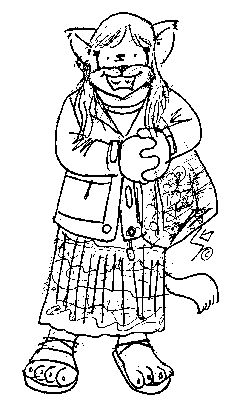
Leslie as a cat drawn by a Montreal cartoonist Simon Gaudet, at the Just For Laughs festival in July
Climb on
First climb of the season in Nordegg this past weekend and despite the rain it was a whole lot of fun. Nailed a 5.10a and finally got the 5.10b I worked on last fall. Here’s to a great new season…

Check out more images here
Samba printing
Enable Samba printer sharing in System Preferences by clicking Sharing → Windows File Sharing. If you upgrade your MacOS version, check to see that Windows File Sharing is still enabled. Caution: if your network is not behind a firewall blocking ports 137 and 139, and you haven’t limited access in /etc/smb.conf, enabling Samba could share your printers and files with the world.
One user has reported that with some versions of MS-Windows he needed a user account on the Mac for each user on the PCs in the network, with the exact name (including capitalization) and password as used on the PCs.
On the ms-windows PCs on your network:
* Go to Network Neighborhood and click on the name of the Mac. You should see an entry for printers and separate entries for each printer you are sharing from the Mac.
* Click on the printer you want to configure.
* In the pop-up, supply the driver to use: if the Mac printer is b/w, use Apple Laserwriter; for a color printer use Apple Color Laserwriter. You may have to insert your system disk or give the path to the printer drivers for ms-windows to find the driver.
* Click OK or Add or whatever your version of ms-windows uses to add a new printer.I know: you probably don’t have an Apple Laserwriter. You still want to use the Apple Laserwriter drivers. The goal is to send proper Postscript to the Mac, which CUPS and the gimp-print drivers on the Mac will translate to the codes your printer understands. Microsoft drivers are notorious for non-portable Postscript, but the Apple Laserwriter drivers work.
You should now be able to print from the PC to the printer on the Mac.
Climbing Photog
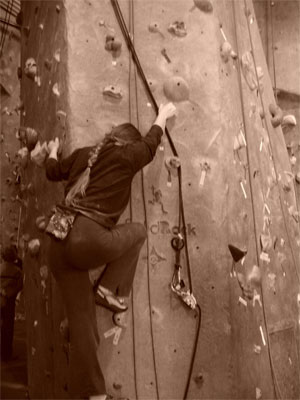
Sepia Rock on
This is L climbing the tower at Virg. I was screwing around with the sepia option onthe camera. Even with digital cameras, monotone images seem to even out the light just perfectly in bad lighting situations and make for a pictures that shows what you want it to show and subdues the rest…
New Toy
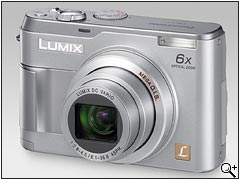
I picked up a new toy… a Panasonic Lumix DMC-LZ1 with a 1 gig sd card. So far so good.
I like the camera and its perfect for those quick snapshots. Oddly enough the only thing that seems missing is the audio on the movie mode… didn’t think I’d need it, but it seems wrong now that I don’t have it.
Post some pics soon…
WordPress 2
Tried to install WordPress 2 and screwed the privileges somehow…
A handy php page found: test5.php gave me the error message (Client does not support authentication protocol requested by server; consider upgrading MySQL client) and this gave me the cure:
***
Alternatively, use UPDATE and FLUSH PRIVILEGES:
mysql> UPDATE mysql.user SET Password = OLD_PASSWORD(‘newpwd’)
-> WHERE Host = ‘some_host’ AND User = ‘some_user’;
mysql> FLUSH PRIVILEGES;
***
fixed it!
Rock On…
Random Image of the Day
Leslie works her way up Red Apple at VIRG in our post Christmas climb
Not so hard drives
Since I basically pillaged Zak’s PC to get mine up and running, he is left without access to his files. So I had him transfer the HD to the external case and copied what he needed via USB 1 (with the requisite error messages about the wrong port speed). Then for kicks I plugged it into the iMac via firewire and lo and behold it mounted right up and the files where there for all to see…
We are a VERY long way from MacLink
Post Mortem
Went climbing the other day and after a month off, I sucked! I died really quick trying to do routes I had already mastered. Mind you L wasn’t any better off. Zak was the only one who seemed to be on the ball and that’s cause he’s been climbing every week.
So I placed 6 overall at the Rip ‘n Grip series… I went back Wednesday and nailed 18 on the first try… sigh. I’m still sick… I even went back to a Doctor (groan) and she said allergies… I say crock but what the hell… I’ll take her drugs. Spring Gardening went to press today, now we only have to get WGH III out the door sometime before hell freezes over.
Random Image of the Day
Setting up a top rope at Kootenay Plains

Rip ‘n
Final night of the Rip ‘n Grip last night, and I did better than I thought I would after not climbing for 3 weeks and just recovering from bronchitis. I nailed 1-15 and 17 and after a few tries got 16. This takes me one higher than previously attained.
I tried all 10 attempts on 18 and finally figured out the middle. But by that time my hands were wasted and I ran out of tries. I’m pretty sure I will get it later when we go back.
Random Image of the day
Me working on a Rip ‘n Grip route almost exactly a year ago…
