Instagram This Week

MarsEdit 3: Offline composing
Composing WordPress posts offline is pretty simple: there are lots of tools available including WordPress’s own apps for both iOS and desktop. Unfortunately they all seem to demand you upload media before inserting it into your post. Which means if you are offline you can’t work on adding pictures until you once again have reliable internet.
I searched and found quite few option but 99% of them (including Microsoft Word) seem to be applicable to old versions of the software and haven’t been updated in a number of years. I guess reliable internet is just assumed these days.
MarsEdit 3
The only exception was Red Sweater’s MarsEdit 3. For $39.95 use it apparently allows you to compose and size images and then post them all at once; a much better solution for when we are away from the internet for days at a time. So I downloaded the 30 day demo and am giving it a try with this post.

Here’s a snap of my brother at a recent curling tourney. It’s set to be centered and 800 x 600 pixels.
Some Quick Notes
The <img> tag uses style=”float:left;” instead of class=”alignleft” which WordPress prefers. But you can edit the macro to ad the appropriate class.
The images are also sized to one size; none of WordPress’s fancy multi-size uploads. So if you get it wrong on the initial upload you are out of luck.
You can also upload images separately using the Upload Utility. Not sure why you would want to but nice to have if it becomes necessary.
Testing out a Block Quote
Security is mostly a superstition. It does not exist in nature, nor do the children of men experience it. Avoiding danger is no safer in the long run than outright exposure. Life is either a daring adventure, or nothing.
—Helen Keller
The interface (adding tags etc.) is menu driven with very few shortcuts or buttons which is a bit antiquated and a bit of a pain, but everything seems to work as promised.
Oh and I just discovered the Rich Text Editor screws up tables. Since I shouldn’t be using tables anyway and the HTML leaves them alone, it’s not a stopper. But again, just a little regressive given the start of online editors these days.
In Conclusion
It’ll work. Kind of like being in a time machine back to the late 90s but it will work. Now I just need to decided if it is worth $50.
Random Text
Lorem Ipsum is simply dummy text of the printing and typesetting industry. Lorem Ipsum has been the industry’s standard dummy text ever since the 1500s, when an unknown printer took a galley of type and scrambled it to make a type specimen book. It has survived not only five centuries, but also the leap into electronic typesetting, remaining essentially unchanged. It was popularised in the 1960s with the release of Letraset sheets containing Lorem Ipsum passages, and more recently with desktop publishing software like Aldus PageMaker including versions of Lorem Ipsum.
Random Head

It is a long established fact that a reader will be distracted by the readable content of a page when looking at its layout. The point of using Lorem Ipsum is that it has a more-or-less normal distribution of letters, as opposed to using ‘Content here, content here’, making it look like readable English. Many desktop publishing packages and web page editors now use Lorem Ipsum as their default model text, and a search for ‘lorem ipsum’ will uncover many web sites still in their infancy. Various versions have evolved over the years, sometimes by accident, sometimes on purpose (injected humour and the like).

Contrary to popular belief, * Lorem Ipsum * is not simply random text. It has roots in a piece of classical Latin literature from 45 BC, making it over 2000 years old. Richard McClintock, a Latin professor at Hampden-Sydney College in Virginia, looked up one of the more obscure Latin words, consectetur, from a Lorem Ipsum passage, and going through the cites of the word in classical literature, discovered the undoubtable source. Lorem Ipsum comes from sections 1.10.32 and 1.10.33 of “de Finibus Bonorum et Malorum” (The Extremes of Good and Evil) by Cicero, written in 45 BC. This book is a treatise on the theory of ethics, very popular during the Renaissance. The first line of Lorem Ipsum, “Lorem ipsum dolor sit amet..”, comes from a line in section 1.10.32.
The standard chunk of Lorem Ipsum used since the 1500s is reproduced below for those interested. Sections 1.10.32 and 1.10.33 from “de Finibus Bonorum et Malorum” by Cicero are also reproduced in their exact original form, accompanied by English versions from the 1914 translation by H. Rackham.
Liveaboard vs Cruising: The Problem with Stuff
One week and counting.
After originally planning to drive, we’ve decided to fly out to the coast and should once again be on board Never for Ever late in the day next Thursday. I can’t wait. Still no decisions on where we are going cruising, but Yahtzee is heading up the west side of the Island and I am green with envy. Maybe not this year, but dammit it’s on the list.
Moving Stuff
Unfortunately the decision to fly has introduced a few wrinkles. When we left the boat last June we put bunch of our stuff into storage, but a bunch more stuff came home with us with the intent to take it back this spring. And on top of that I picked up some gear for my Pacific coast trip. We’d planned to haul it all back out with us in the car — I’d actually bought the bloody hatchback specifically for that purpose. But now, given the airlines current baggage policies and the added fact we are taking a float plane from YVR to Nanaimo, my well-planned gear and provision lists are out the window and we are back to square one.

So now I am going through everything and rating each between 1 and 3 to indicate their relative importance. 1’s will definitely be coming, 2’s will be fit in according to space and 3’s will most likely be staying behind.
What’s The Problem
So what’s the big deal? Never for Ever is now a charter boat and she comes with everything one needs. Right?
And there-in lies the real topic of this post. The boat certainly does come with everything for a successful vacation and, with the added benefit of our personal blankets, linens, and various kitchen doodads we left in storage, it should be comfortable enough. But the crux is the question of how comfortable is comfortable enough? After spending a whole year aboard we grew to have certain minimum standards and expectations. Two frypans for instance. I learned to prepare a lot of things using the two pan method and now there is only one left aboard. Oh and my Staub casserole dish, clay garlic pot, and good cutting board all make life easier. And my good knives … And that’s just the galley. I have a bunch of new books I wanted to bring out, some comfort items like bath mats, extra sheets and pillowcases, my favourite pillow, and sundries like a better first aid kit and a new sewing kit. Then there is the cordage, clips and other bits of hardware I had intended on bringing out. Add in our personal gear for two months and it’s just not all going to fit in the 35 lbs each we are allowed by Seair.
Some things are just minor (in)conveniences, our favourite blanket and laptop stand that make watching movies in the evenings a bit more comfie or some extra soft bath towels, but then I’ve got my new sailing boots, coastal jacket, and water walkers along with cold weather gear like long johns, scarves, gloves and rain gear which are bit more important. I had also intended to bring our small inverter, a spare set of binoculars, a few new LED emergency lights and a new Canadian flag.

The sailing gear box at home.
Tools. That’s the big one. I don’t have a specific boat set so I brought 90% of them home. And sadly that’s where they are going to stay this year. And that means a whole whack of boat projects just disappeared from list. Sigh.
Small Things Make a Big Difference
Again, what’s the big deal? It’s subtle but I’ll take a stab at explaining it. Like the heading says, small things make a big difference and when contemplating spending two months on a small boat before summer really takes hold, it’s truly about the seemingly minor things. For example, a good kitchen knife changed my life when I finally got one and 2 months using a bad one is just not worth it. It will be coming. And my good casserole dish? The thick clay heats well and cleans easily; it makes certain dishes easy and fun and without it a whole bunch of menu items get crossed off the list: this one is currently rated a 2 on my 1–3 scale of importance. Hell, I’m old enough that sleeping on an uncomfortable pillow is…well… uncomfortable. I want my good pillow dammit. A good night’s sleep is damn important.
 Small things indeed but understand one key point: after living aboard the boat familiar routines are reassuring and their absence can allow small frustrations to build. I am a firm believer in looking after the details and letting the bigger picture take care of itself. But if I can’t take my stuff, then it’s harder to manage the details as well as I want, and then the whole trip risks seeming somehow…less-than.
But Is That Really the Issue?
Well no. The issue really comes down to the difference between living aboard and cruising.
Cruising — to me — is more of a series of small journeys strung together. You are only in each location for a short period of time so you make the most of it and put off “real life” for later. It’s relaxing (in its own way) and you live the adventure in the moment. I enjoy it, I really do. But our year of living aboard showed me that cruising (by my definition) isn’t sustainable; “life” is after all inherent in “living” aboard.
And you know what? Surprisingly I liked that. A lot.
The difference between cruising and living aboard is most easily illustrated by — although not by a long shot limited to — the tools. Things on the boat break. Or need improvement. Or just cry out for a tinkering or two when you are hanging on the hooks and looking for something to do. If it is just a cruise of week or two, or even three, you will likely just wait until you get home to have a go at repairs/upgrades etc. But living aboard means you are away full-time and these things go on the list that you are constantly (and futilely) working to reduce. It’s part of the lifestyle and frankly it’s kind of fulfilling when you McGyver the rigging in the middle of Von Donop Inlet with just what you have to hand. After all, you are just hanging there for 4 days so you might as well get something done. Right? And without the tools I won’t be able to do much without heading back to the base at Nanaimo.

A few of the things that won’t likely make it back to the boat this trip.
So there you are, dealing with life’s little problems, soaking in the lifestyle, watching the rain fall and enjoying your 3-day-old bread —that’s the life. And, just like living ashore, it is the small, personal things that made living aboard more than just workable—they made them comfortable. And comfort is my beginning point for transforming things from enjoyable to joyous. When we are comfy and toasty in our cold-weather gear, then a cold, wet sail in 25+ knots is an adventure and not a trial. When the end of a cold rainy day brings a piping hot cheese-baked pasta dish with fresh bread, it imbues that day with pleasant memories, not ones of scraping baked-on gunk off a pan. And when you finally beat that broken head into submission and emerge to breathe in the glory of an isolated inlet in our beautiful PNW, it makes a sweaty, uncomfortable, mostly gross task seem a monumental accomplishment. That and the beer you’ve been thinking about all afternoon.
But At the End of the Day
This little setback just reminds me of what I really enjoy about the boating lifestyle and the kinds of little things we learned during our liveaboard phase. Doing it again is high on my current list of possible futures so I guess we will start building some new expectations and getting ready to settle in once again.
So ya, I am a bit put out by the fact that I have to leave a bunch of stuff behind, and I have been prioritizing and re-prioritizing all week, and will likely continue to do so until we head to the airport. But I’m not really complaining, because in a week’s time I will be once again aboard our boat with nothing more important to do than just live my life and I’m grateful for that.
…I’m just not going to guarantee I won’t be spending the first few days enjoying Nanaimo’s beautiful harbour and buying everything I just scratched off my list.
—Bruce #Equipment, #Liveaboard
Instagram This Week


Making Videos, Animating Graphics
I consider the video below a partial success. I managed to do what I set out to do, but frankly it didn’t end up meeting my minimum standards to call it good. But I have been humming and hawing for days now and finally decided to just post it and move on, because anything else would mean starting from scratch and I think it would be a waste to toss the whole thing. So check out the first of a series of planned sailing itineraries:
Method
The first thing I need was a map. The problem is that maps aren’t free despite what you might think given Google’s presence online. And I wanted something I could manipulate the way I wanted to. So I started with a bunch of base maps that I stitched together and started tracing.
 Layer one was the base map that was a not-so-simple outline. Back in my book publishing days, I made a ton of these, oddly enough mostly of BC. But that was when I was still using Freehand before it disappeared and Illustrator became the de facto standard. And I really hate Illustrator. Well, I don’t so much hate it as resent the fact that all those years of learning Freehand now work against me. But such is life in the design community: move on and keep learning. At least the hours spent working on this map have helped get my Illustrator skills a little more polished. would have liked to add even more detail but the file was starting to balloon in size and it wasn’t actually necessary to have that much accuracy — so I started to slack a bit in places like the west coast of the Island.
Then I added in coloured layers, borders, labels and whipped up a quick compass rose. After that was done I started building a series of layers with smaller area maps that I could use later to highlight the cruising grounds.

With that done I saved the file and I fired up a new project in Adobe After Effects, then imported the Illustrator file into it. One of the great things about after Effects is that it imports the files with the layering intact and, even better, maintains a hot link to the original file so if you have to go back and change something it updates automatically (which I did several times). In After Effects I proceeded to divide the project into two main sections: the Salish Sea intro and the first planned itinerary, add some more labels and build in animations. I had an idea of what I wanted to do but no idea of how to do it. YouTube to the rescue. All the graphic animations of the map were done in After Effects including the zooms and the move pathways of the route itself.

Once those were done I exported it as two videos so I could move on to Premiere. After Effects and Premiere do support the a method of hot linking files but some of the effects I used were not supported so I was forced to render the After Effects files. This just meant that any changes that needed to be done would mean re-rendering the files and updating them in Premiere — a matter of something like 15 minutes work for each video, each time I did it. So I tried not to do it. And pretty much failed.
In Premiere imported the two videos, a selection of still images from my archives and my intros/outros. Then I proceeded to build the initial text graphics and started breaking the videos down into a rough cut.
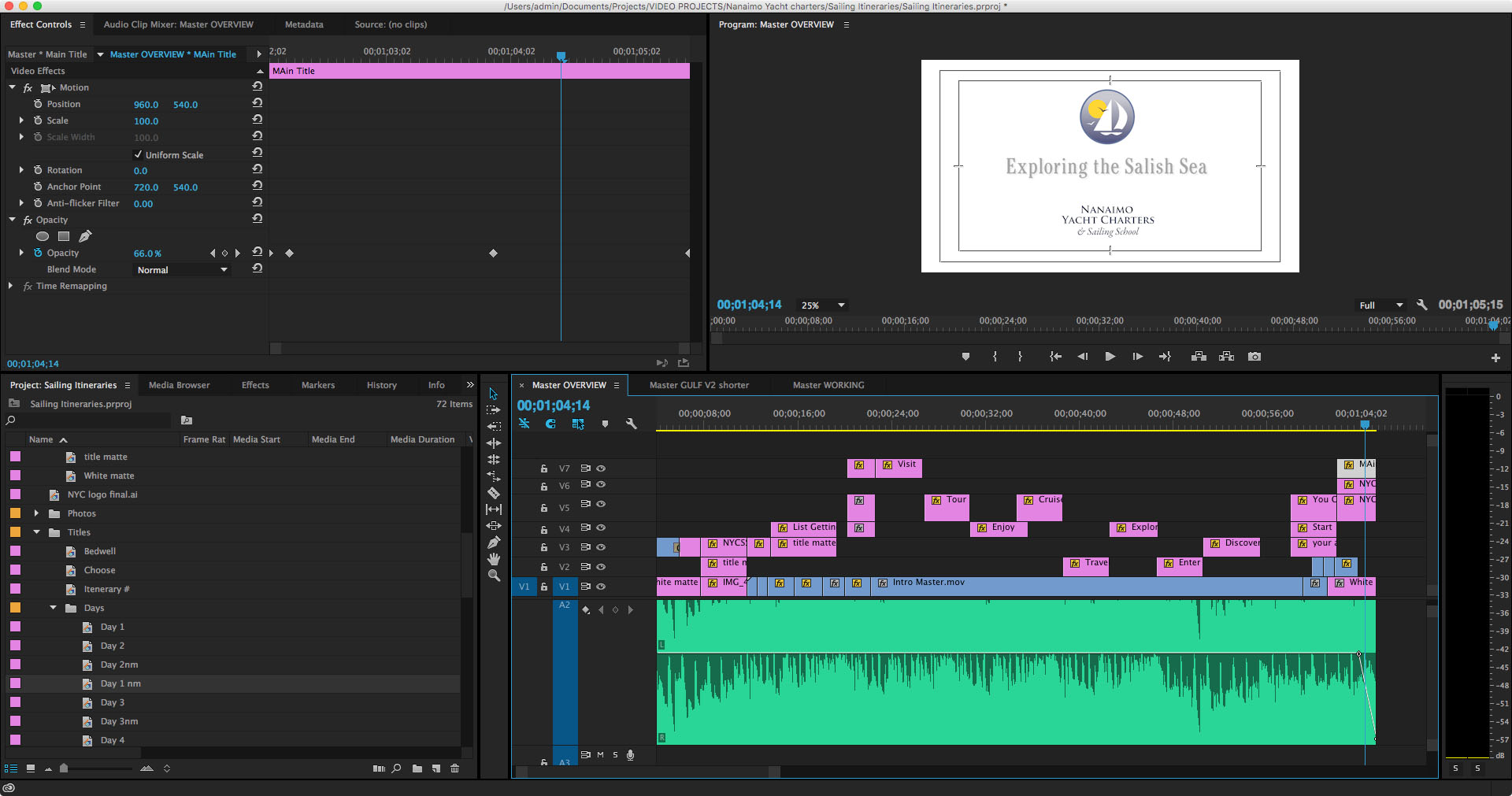
Once the rough cut was done I stared animating the text, fine tuning the timing and playing with the narrative to try and get my point across. Although by this time I was starting to wonder what my point was —which was a huge learning lesson in itself.
Eventually I got it to some place that wasn’t particularly horrible and brought in some music. Originally I wanted to do the project with a scripted voice-over but finally decided that was too much additional work for what it was looking like I was going to be able to produce as a final product. I will likely revisit that decision on the next video (if I go ahead with the project) and be able to better anticipate what I will need to have done in what order to support that sort of narrative. And then I unfortunately got carried away laying the audio track and managed to box myself into a few more corners that would take too much work to back out of.
Lessons Learned
At this point I essentially gave up on trying to improve deficiencies and focussed on completing something. I’d spent a little over a month on this so far and it was increasingly looking like I would have to go back and start from scratch (well, not quite from scratch, as the Illustrator map was perfect) in order to be able to get the result I was looking for. So I decided to get it to good enough and move on. And that’s what you see here.
Preplanning
I learned a few things about planning such an extensive media project. The first thing —which I already knew, or thought I did — is that eh more pre planning you do the less pain and problems you will encounter further down the road. I don’t think I truly appreciated how much I have learned about graphic and print production over the years that has allowed me to work fairly smoothly and problem solve on the fly without excessive documentation. Not so for motion graphics; I have a lot to learn and until I do, working out the kinks before I go into production is going to have to be the rule of the day.
Editing yourself
Again, less is more is a graphic design mantra I have long since internalized but it didn’t manage to make the transition to motion graphics. The amount of time I wasted on fancy-dancy effects that ultimately got left on the digital cutting room floor accounted for a huge percentage of the effort I have put into this. With every iteration I found myself cutting and editing things to try and simply the narrative. And frankly I still think I could have done a lot more.
Shortcuts, shortcuts, shortcuts
Know your tools. I have a personal rule that states if you do a set of actions more than three times in one session then take the time to learn shortcuts. Whether it is keyboard shortcuts, macros or simply a more efficient way of achieving your goal it almost always pays dividends when you take some time to explore your toolkit.
And organization helps a lot. I started out with a free for all of files and eventually found myself making more and more bins and folders to organize image, title bars, video clips and sequences. Next time I will start out with a whole lot of empty folders and keep it tidy as I go.
Teams
One of the reasons graphic designers can work alone and filmmakers generally don’t is that it take a huge set of disparate skills and talents to bring together motion graphics. Simply melding the audio and visual components is a massive sideways shift in perspective and I have a renewed respect for those who are auditorially skilled — I’m certainly not. As an audience we experience video differently than we do a static page and there is a whole language I am learning to describe how viewers interact with the screen. A lot of it comes from how we read and view the printed page, but a lot it does not. I am going to have to learn more than a few software programs if if I want to get better at this.
In conclusion
Anyway, I have called this project a wrap and will move on to the next and hopefully do a better job. Because every time I look at this particular video I still want to go in and change something — and I think it’s time to stop looking.
If you have any interest in seeing more sailing related video, my youtube channel can be found here:
Instagram This Week

Instagram This Week


This year’s wish list
Last year around this time I posted up my to do list to get ready for the season. This year, due to having Never for Ever in charter, my actual To Do list will be limited sending the email that commits to our arrival date (hopefully late April) and the boat should be ready to go when we arrive. All we will need to do is grab our gear out of storage and settle in.
But that doesn’t mean I don’t have things I want to do or, more specifically, want to buy. So far our additions to the boat have been rather modest. We picked up a Rocna anchor before we set off, installed a new Sony Media Player the first couple of days aboard, and added a Battery Monitor Kit after we returned from the Broughtons. But other than that we haven’t added much to the boat despite my grand plans. But hopefully, finances willing, I will get to add a few new toys this season.
But the real question is, since we are no longer full-time cruising, how much to invest in this baot and how much to save for our “forever” boat.
First up may or may not be a new windlass. The seals on our old one are shot and in heavy seas water streams down into the front cabin. Not good. But the thing is old enough that parts are a problem. If we can find the parts, well, all is well and good. If not, then we will be in the market for a new windlass.
Then I went through my old wish lists (pre-purchase) and, leaving out the things that came with the boat, compared them to what I want to add after being full time cruisers.
Old List
- Generator/100 amp alternator
- Wifi Booster
- AIS
- Hammock
- Code 0 sail
- Dyson Mini Vac
- Water maker
New List
- Generator/solar
- Wifi booster (cell phone booster)
- TV and a way to stream to it.
- Range finder (binoculars)
- Stadium Seats
- LED lights (more)
- Stone baking ware

Some things haven’t changed. And some have.
- On-the-hook power is still the number one item we wish we could improve, but no matter how we look at it, it’s a boat buck or two (~$1000–$2000) that I don’t have. And frankly it’s not as big a concern if we aren’t spending months on the boat. Still, a generator would be nice since we could just take it with us if/when we move on to another boat so I keep an eye out on Kijiji to see if there are any good deals. Solar is likely also a non-starter but I am still planning out various scenarios just in case. I’ve abandoned upgrading the alternator since it would mean changing the pulleys, as well as getting a smart regulator on top of the alternator. Solar would almost be cheaper. And frankly I don’t want to do that much motoring anyway.
- Connectivity. We constantly blew over our data plan last year until we wised up and increased it. I am really wishy-washy about this. I figure it’s around $500 all in to set up a booster, antenna and a wireless router. Is that reasonable if we are only sailing two weeks? No. Eight weeks? Probably.
- AIS? I hooked up the Standard Horizon to the chartplotter and now have an AIS receiver; I don’t think a transmitter is necessary at this point. So now #3 is a TV and some way to connect it to my harddrive full of movies. Never for Ever once had a TV mounted on the front bulkhead — the lovely coastal art covers the holes — and it still has a dvd player mounted under the chartplotter. The folks at Cunning Little Plan installed a TV and DVD player converted to 12v and their’s seems like a feasible plan. Call it $225 for the electronics and probably another $50 for hardware and wire. Leslie is against the idea but I think it will add value to the charter and grant us a bit more comfort when we are watching movies.
- Hammock? It’s just fallen off the list for now. Rangefinder Binoculars? I suck at distances in anchorages and love a good pair of binoculars so it seems like an obvious choice— only $200! I think of this item as more of a”special treat” though so I’m pretty sure it won’t be happening unless I come into some “extra” cash.
- Let’s dispense with the rest of the old list (Code Zero sail, Dyson mini-vac and watermaker) by saying “too extravagant, not enough utility.” Stadium seats however are cheaper, more practical and directly add to comfort. We had won a West Marine folding seat at the Hunter Rendezvous and I really like it despite the fact I have wrecked the foam already. A couple more at $80 a pop more would perfect.
- LED lights. Around $20 each we already have at least one LED in each cabin so that’s good enough for now but we should get on with replacing all of them.
- Donna from Northwest Passage had a bunch of stoneware baking pans and I loved them. She got hers from Pampered Chef and I have my eye on at least a nice cookie sheet and a loaf pan (around $40 each)

So what is likely? I think the TV, maybe a couple of LEDs and at least one seat. And as I said I will keep my eye out for a good deal on a generator but being able to stay on the hook for a few extra days only saves me $50/night—it’ll have to be a good deal. The rest will rely on finding the right deal at the right time. Or maybe I’ll save my money and spend it on beer, after all beer is important. Right?.
—Bruce #Equipment
Instagram This Week
Instagram This Week


“But I loves you!”