Category: Computers
A new look at old art
I got a new stylus today for my iPad and thought I’d try it out. Using Adobe’s Ideas app I tried sketching a few things. Finally I settled on the old Web of My Own Devise and here are the quick results, drawn, sized, converted and uploaded from the ipad… Not too bad.

Later at work I added the transparency back in and sized it appropriately for a final, clickable piece of ‘art’.

The png file has to be RGB and unfortunately the shadowbox theme won’t work as black on black is … well… black. Here’s a link to see the image without the shadowbox.
Testing Smooth Galleries… Again
Basically for the Next Gen Smooth Gallery plugin to work, I have to resize the images. I was hoping to avoid this as I’d like to link to the full size ones but so far no-go… I think there is a way to link to the wordpress galleries as well…
The following gallery is coded:
smooth=id: 8; width:530; height:500; timed:true; delay:6000; arrows:true; carousel:true; transition:fadeslideleft; links:true; info:true; align:center; frames:True; open:true; text:Pictures;
[smooth=id: 8; width:530; height:500; timed:true; delay:6000; arrows:true; carousel:true; transition:fadeslideleft; links:true; info:true; align:center; frames:True; open:true; text:Pictures;]
[smooth=id:xx; width:xx; height:xx; timed:xx; delay:xx; transition:xx; arrows:xx;
info:xx; carousel:xx; text:xx; open:xx; links:xx; margin:; align:;]
id: The id you were already using on [ gallery=id ]
width: Width of your image container
height: Height of your image container
timed: true/false to slideshow your images
delay: Time in miliseconds before moving to the next image
transition: Animation when moving to the next image: fade, fadeslideleft,
continuoushorizontal, continuousvertical, crossfade, fadebg
arrows: true/false to see the arrows for next/previous images
info: true/false to show the image description
carousel: true/false to see all thumbnails
text: Text relative to the Carousel
open: true/false to show the carousel opened/closed
links: true/false to click on the image and open the original image alone
margin: Distance from the gallery border to the text
align: Gallery alignment: left, right, center, float_left, float_right
I find this humorous, but…
…then again , I think its mostly true…


I didn’t think it would happen to me
iPad Envy.
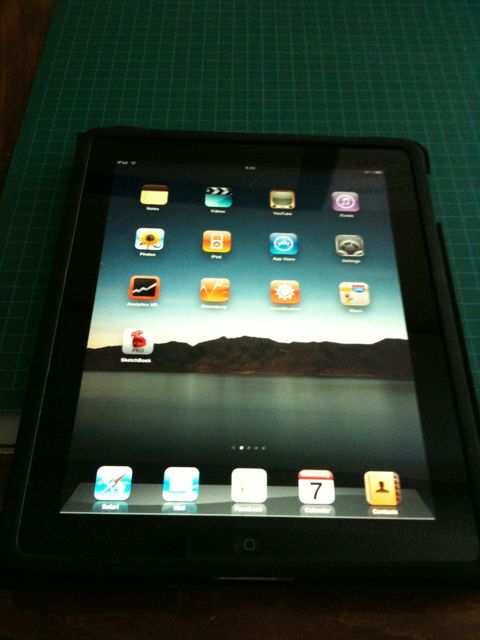
Scott brought in his iPad today and I fell in love. The comic book app and the Popular Science app were everything a new publishing platform could ask for.
Honestly I think those things alone are going to make this puppy worthwhile.
More Image Plugins
Testing the NextGen Smooth Plugin which uses NextGen galleries
[smooth=id:9;]
Apparently it doesn’t resize originals leaving the author the chore of resizing everything to fit the display box; I think not… oh well. I am thinking though, that the Next-Gen Plugin is less valuable than the shadowbox one for posts rather than pages anyway. This likely means I will disable the plugin sometime in the future so don’t be surprised if no pics appear in this post…
So check out the new Condo Page for updated and ongoing condo pics and I’ll reserve shadowbox for the in-post stuff…
Welcome home…
Because of the vociferous complaints of one unusually loud and bossy individual who I dearly love and am afraid to disappoint, mostly because she’ll hurt me again, even though I did punch her in the face, but that really isn’t relevant and should never be mentioned again, and really she isn’t that mean, unless you count the time that… but wait, you don’t want to hear about that again, because it’s not like we all don’t know just how scary she can be without trying, or at least without trying too hard, I am moving my longstanding blog from its home on my desktop to the big old scary internet.
Welcome to macblaze.ca
I will spend the next couple of days fixing links and making sure it runs smoothly, but there have already been some hiccups.
Note: this server is case sensitive in it’s links…
The History of the Internet

The History of the Internet is a neat article to browse, and it gives a good idea of how far we have come in such a short time…
GoDaddy Hosting MYSQL
I’ve added a domain name (macblaze.ca) and am currenty hosting it on GoDaddy. What I need is to get the connection string for the mysql set up and Dreaweaver is giving me errors. MYSQL Error #1251
I eventually came across this post which gave me a working string:
< ?php
//Sample Database Connection Syntax for PHP and MySQL.

//Connect To Database

// $hostname="your_mysqlserver.secureserver.net";
// $username="your_dbusername";
// $password="your_dbpassword";
// $dbname="your_dbusername";
// $usertable="your_tablename";
// $yourfield = "your_field";

// mysql_connect($hostname,$username, $password)
// mysql_select_db($dbname);

?>
So far so good?
***
Nope…
****
AFAIK Dreamweaver just ain’t gonna work… sigh….
Sony Reader PRS-600 Review
or “what I got for Xmas this year”
I got a lovely new Sony Touch ebook reader for Xmas. While I had previously attempted to use Stanza on my iPhone, the ebook experience had never really appealed to me. But since I had the new toy, I was determined to give it a valiant effort. I just finished my first book (David Weber and John Ringo’s March UpCountry) and I thought I’d give the experience a review.

As I’ve mentioned I have an iPhone. I love the Apple user experience. From the first iPod I bought with its flawless install and seamless box to user process, I have been hooked on the idea of a great novice experience. Sad to say, the Sony system did not hold up.
Install
First off the install is slow and the install files on the device are only a link to the Reader website. A pain in the butt when you are on borrowed internet connections at your parents house. Eventually we got it done though it was far from seamless.
Software
The software itself, Reader Library, is a pale imitation of Apple’s iTunes. It maintains two different libraries, one on the device and one on the computer. The synch works but it is flakey and the actually location of the files on you computer is subject to a bunch of odd vagaries that I have yet to discover. Suffice it to say if you’ve added files directly to the Library on you computer, don’t you dare move the originals or you’ll spend hours trying to figure out why teh damn thing chokes on synching…
Hardware
The hardware suffers mostly from two flaws: one is teh lack of light so the screen is dim (I read that teh touch model is even dimmer that the others). This results in having to spend more time finding the right reading position every time the light shifts or you move to a neew reading spot.
The other issue is more of a comparison to the iPhone. I love the touch screen on the iPhone and am used to its reactions. The Reader is a different technology all together and its taken quite a bit of time to get used to. IN the end I prefer the iPhone as it is responsive 100% of the time, while the reader often doesn’t understand you gestures due to difference sin pressure of directions.
Content
Content was also a bone of contention until I figured it out. I guess the only flaw here is that I again compared it to Apple’s integrated system where files moved from one place to another magically and all the content in the world was at my finger tips. Sony has a store but I have yet to bring myself to buy ans ebook for $12.95. Being in the biz, I just can’t justify spending that kind of cash on an ephemeral technology that has very little physical cost associated with it.
There is no warehousing costs, not pp&b (print paper and bind) and the production costs can be spread over the paper editions. $5 and under I can see but there are $20 books out there…
Eventually I found Baen Books free site and downloaded something I actually wanted to read for free. I have book 3 in the series so it was nice to download 1 and 2 and in all likelihood I’ll pick them up next time they are released. A way better model than trying make me pay hardcover prices for something I’m likely to lose the next time my computer thrashes itself.
The Experience
As for reading the book… well it took a while to get used to. It helped that I found a book that I wanted to read and I had made a commitment to really try. I figure by about page 100 I was into the groove enough to zone out and forget about the rest of the world (my primary reason for reading sci-fi). As the pages went by I was more and more comfortable and as soon as I was done book 1 I immediately dove into book 2.
The light is an issue. It’s not a huge one and you can compensate for it. Given that the reader is lighter, easier to hold in one hand, has multiple ways of changing pages without having to shift position and “holds itself open”, I think the trade off is more than fair. I especially like that I can fall asleep and it will turn itself off and remember my page.
If the charge is as good as they claim, it will be the perfect traveling book. Instead of hauling 10 paperbacks to Europe, I can just bring the one. This of course will rely on the availability of books that are under $5, but I think I can make do.
Conclusion
I like it. It won’t replace all my books, but if something good comes along I’ll definitively download it and read it on the reader. It would be perfect if the pricing was more reasonable: I hate hardcovers and get annoyed having to wait 1 year+ to read book 6 of something. If they released the ebook for a reasonable price I could read it early and pick up the paperback when it was released. At least companies like Baen and Tor seem to get it… mostly. We’ll have to wait and see..
Playing with Nextgen-gallery Plugin
I added the Next-gen gallery plugin with instructions by David Potter. I had to disable the images in theShadowbox JS plugin to avoid a disconcerting double effect.
Examples of usage can be found here.
Here’s a gallery of random climbing pics…
nggallery id=8 (in square brackets)
[nggallery id=8]
nggallery id=8, template=carousel
[nggallery id=8, template=carousel]